


A new cumulative update has been released for SharePoint 2013 (June 2018 CU)
This CU fixes all SharePoint 2013 products.
SP Build: 15.0.5041.1000
This CU is a full update (Uber package), requiring no earlier updates apart from SP1.
The CU includes all SharePoint 2013 security fixes released since SP1. It does not include SP1, which is required to install this CU.
Because of its size, the CU is split into separate CAB files and one executable. Download all these files into the same installation folder before starting the update.
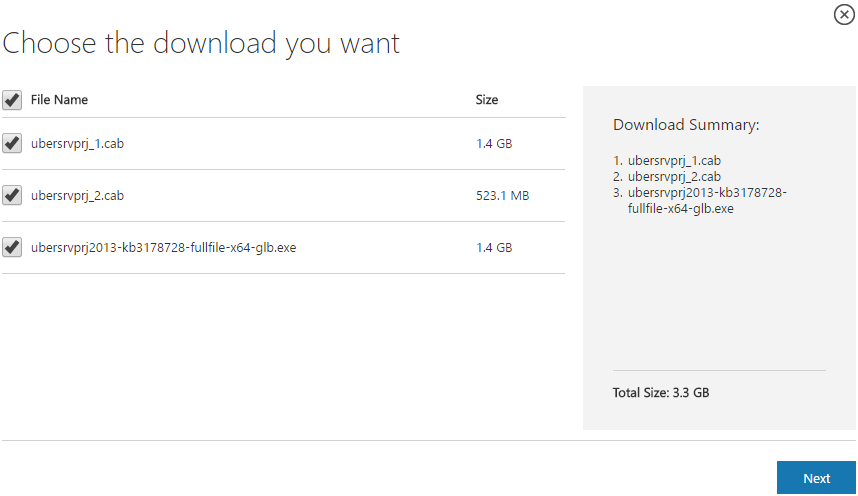
SharePoint 2013 CU – KB articles describing the CU:
- KB 4022184 – SharePoint Foundation 2013 June 2018 CU
- KB 4022187 – SharePoint Server 2013 June 2018 CU
- KB 4022185 – Project Server 2013 June 2018 CU
- KB 4022183 – Office Web Apps Server 2013 in June 2018 CU
SharePoint 2013 CU – CU download link:
- Download SharePoint Foundation 2013 June 2018 CU
- Download SharePoint Server 2013 June 2018 CU
- Download Project Server 2013 June 2018 CU
- Download Office Web Apps Server 2013 June 2018 CU
After installation, remember to run the SharePoint 2013 Products Configuration Wizard, or:
PSConfig.exe -cmd upgrade -inplace b2b -wait -cmd applicationcontent -install -cmd installfeatures -cmd secureresources -cmd services -install
Important
Before installing the CU, ensure SP1 is already installed.
Installation may take up to five hours, so I recommend reading: Speeding up CU and SP installation on SharePoint 2013.
If your farm's patch level is earlier than July 2015 CU, run PSCONFIG immediately after installing the CU to update the schema of certain search databases. More at:
https://blogs.technet.microsoft.com/stefan_gossner/2015/07/15/important-psconfig-is-mandatory-for-july-2015-cu-for-sharepoint-2013
Always install only the CU matching your product version on a SharePoint 2013 farm.
The Project Server 2013 CU already includes:
- CU SharePoint Server 2013
- CU SharePoint Foundation 2013.
The SharePoint Server 2013 CU already includes:
- CU SharePoint Foundation 2013
Remember to update Distributed Cache as well as SharePoint; see How to update Distributed Cache correctly.
Included fixes and improvements
This CU includes the following fixes and improvements.
SharePoint Foundation 2013
This security update resolves vulnerabilities in Microsoft Office that could allow remote code execution if a user opens a specially crafted Office file. To learn more about these vulnerabilities, see Microsoft Common Vulnerabilities and Exposures CVE-2018-8252.
This security update contains improvements and fixes for the following nonsecurity issues:
- When an item is deleted from the usage analytics caches, the item is now also deleted from the analytics reporting database.
- This update fixes the following three issues that concern the SharePoint Properties Panel:
- When you save a SharePoint properties panel with required properties for the first time, you cannot find the properties.
- The DateTime format is assumed to MM/DD/YY.
- The lookup type is set to nil when the label is selected.
SharePoint Server 2013
This security update resolves vulnerabilities in Microsoft Office that could allow remote code execution if a user opens a specially crafted Office file. To learn more about these vulnerabilities, see Microsoft Common Vulnerabilities and Exposures ADV180015.
This update fixes the following issues:
- When you run a full synchronization in the User Profile Service Application, user profile synchronization cannot synchronize values for Business Connectivity Services (BCS) custom user profile properties (multivalued).
- When you try to synchronize a custom time zone from a Business Data Connectivity (BDC) database to a User Profile Application (UPA) database, you receive the System.InvalidOperationException exception.
- When SharePoint Server 2013 consumes search from Microsoft Office 365 (hybrid search with SharePoint Server 2013 and Office 365), private groups are not returned.
-
During a high query load, search may leak flow handles. When all flow handles are consumed, you receive the “Something went wrong” error instead of the query result.
Project Server 2013
This update fixes the following issue:
Even if a user never touches or owns an assignment, the Status Update History page shows the assignment is updated by the user. For example, the status history in the approval center shows that a status manager approved an assignment even if the status manager did not approve.
Office Web Apps Server 2013
This security update resolves vulnerabilities in Microsoft Office that could allow remote code execution if a user opens a specially crafted Office file. To learn more about these vulnerabilities, see Microsoft Common Vulnerabilities and Exposures CVE-2018-8247.
Komentáře