


A new cumulative update has been released for SharePoint 2013 (January 2018 CU)
This CU fixes all SharePoint 2013 products.
SP Build: 15.0.4997.1000
This CU is a full update (Uber package), requiring no earlier updates apart from SP1.
The CU includes all SharePoint 2013 security fixes released since SP1. It does not include SP1, which is required to install this CU.
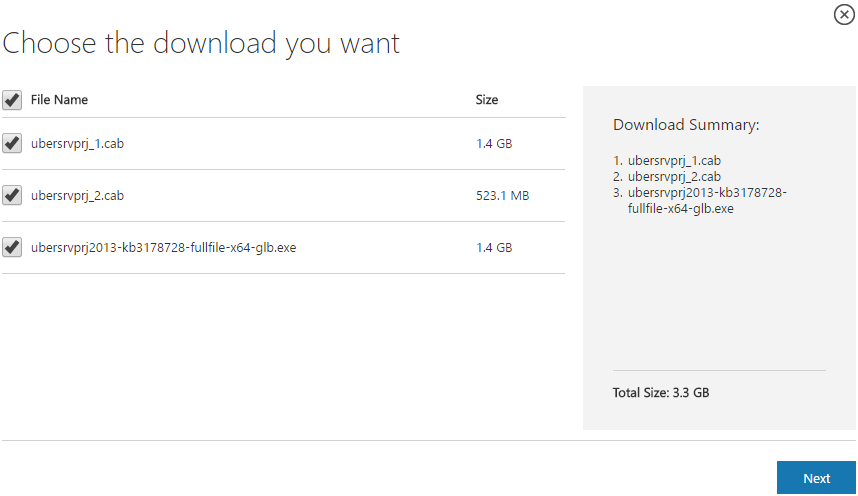
Because of its size, the CU is split into separate CAB files and one executable. Download all these files into the same installation folder before starting the update.
SharePoint 2013 CU – KB articles describing the CU:
- KB 4011649 – SharePoint Foundation 2013 January 2018 CU
- KB 4011652 – SharePoint Server 2013 January 2018 CU
- KB 4011650 – Project Server 2013 January 2018 CU
- KB 4011648 – Office Web Apps Server 2013 January 2018 CU
SharePoint 2013 CU – CU download link:
- Download SharePoint Foundation 2013 January 2018 CU
- Download SharePoint Server 2013 January 2018 CU
- Download Project Server 2013 January 2018 CU
- Download Office Web Apps Server 2013 January 2018 CU
After installation, remember to run the SharePoint 2013 Products Configuration Wizard, or:
PSConfig.exe -cmd upgrade -inplace b2b -wait -cmd applicationcontent -install -cmd installfeatures -cmd secureresources -cmd services -install
Important
Before installing the CU, ensure SP1 is already installed.
Installation may take up to five hours, so I recommend reading: Speeding up CU and SP installation on SharePoint 2013.
If your farm's patch level is earlier than July 2015 CU, run PSCONFIG immediately after installing the CU to update the schema of certain search databases. More at:
https://blogs.technet.microsoft.com/stefan_gossner/2015/07/15/important-psconfig-is-mandatory-for-july-2015-cu-for-sharepoint-2013
Always install only the CU matching your product version on a SharePoint 2013 farm.
The Project Server 2013 CU already includes:
- CU SharePoint Server 2013
- CU SharePoint Foundation 2013.
The SharePoint Server 2013 CU already includes:
- CU SharePoint Foundation 2013
Remember to update Distributed Cache as well as SharePoint; see How to update Distributed Cache correctly.
Included fixes and improvements
This CU includes the following fixes and improvements.
SharePoint Foundation 2013
This security update contains improvements and fixes for the following nonsecurity issues:
- When you use some custom claims providers, you encounter an exception during the token update.
- You cannot load EditForm.aspx pages if you use a custom master page that contains allow framing web parts. You also receive the following error message:
Sorry, something went wrong
An unexpected error has occurred.
- You may experience data loss when you coauthor Microsoft Word, Excel, or PowerPoint documents. This issue occurs because of a winning strategy that your changes are override by other people who saves the documents last time.
- When you change the view of an announcement list from current view to summary view, you might receive one of the following error messages:
TypeError: Unable to get property ‘GroupField’ of undefined or null reference (IE)
TypeError : b is undefined
- When you add a user to a Microsoft SharePoint group, SharePoint adds the user to “Members” group instead of the group you selected.
SharePoint Server 2013
This update fixes the following issues:
- Assume that you don’t select any options under Display Settings. When you try to upload a new profile picture, the upload picture dialog box may not function correctly.
- When the User Profile Synchronization service is restarted, the mapping for the Preferred Name property is cleared.
- The rich text fields in an InfoPath form lose their formatting when you promote a form property to a SharePoint Library property.
This update also improves the translation for the Find a file search box in the Catalan version of SharePoint 2013.
This security update resolves vulnerabilities in Microsoft Office that could allow remote code execution if a user opens a specially crafted Office file. To learn more about these vulnerabilities, see Microsoft Common Vulnerabilities and Exposures CVE-2018-0799.
This security update resolves vulnerabilities in Microsoft Office that could allow remote code execution if a user opens a specially crafted Office file. To learn more about these vulnerabilities, see Microsoft Common Vulnerabilities and Exposures CVE-2018-0797.
Project Server 2013
This update fixes the following issue:
- Consider the following scenario:
- You go to the Delete Enterprise Objects page and then select timesheets.
- You select a date range.
- You click the Delete button.
In this scenario, the process starts, but later you see an error message that resembles the following:
Sorry, something went wrong
An unexpected error has occurred.
Technical Details
Troubleshoot issues with Microsoft SharePoint Foundation.
Correlation ID: 0xxxxxxx-xxxx-xxxx-xxxx-xxxxxxxxxxxx
Date and Time: <Date> <Time>
Additionally, when you view the queue jobs, you find that they have not completed. This problem can occur if there are thousands of timesheets and hundreds of reporting periods.
Office Web Apps Server 2013
This security update resolves vulnerabilities in Microsoft Office that could allow remote code execution if a user opens a specially crafted Office file. To learn more about these vulnerabilities, see Microsoft Common Vulnerabilities and Exposures CVE-2018-0797.
Komentáře