


A new cumulative update has been released for SharePoint 2013 (May 2017 CU)
This CU fixes all SharePoint 2013 products.
SP Build: 15.0.4927.1001
This CU is a full update (Uber package), requiring no earlier updates apart from SP1.
The CU includes all SharePoint 2013 security fixes released since SP1. It does not include SP1, which is required to install this CU.
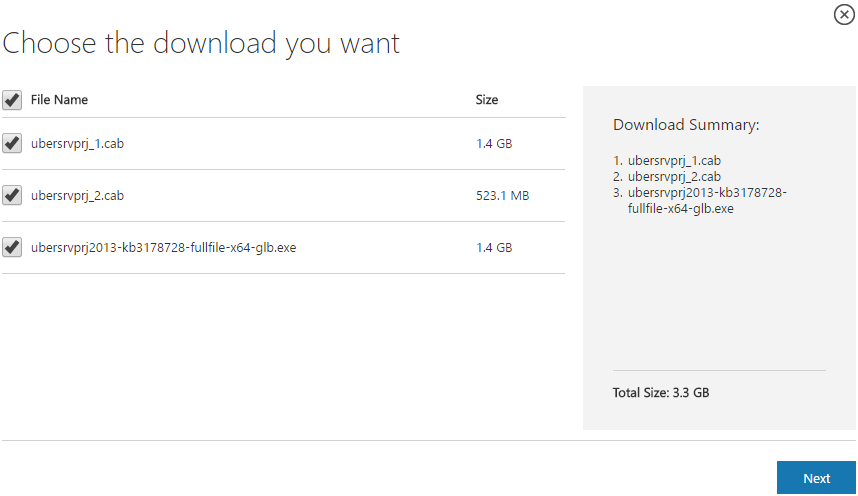
Because of its size, the CU is split into separate CAB files and one executable. Download all these files into the same installation folder before starting the update.
SharePoint 2013 CU – KB articles describing the CU:
- KB 3191911 – SharePoint Foundation 2013 May 2017 CU
- KB 3191913 – SharePoint Server 2013 May 2017 CU
- KB 3191912 – SharePoint Server 2013 with Project Server May 2017 CU
- KB 3191888 – Office Web Apps Server 2013 May 2017 CU
SharePoint 2013 CU – CU download link:
- Download SharePoint Foundation 2013 May 2017 CU
- Download SharePoint Server 2013 May 2017 CU
- Download Project Server 2013 May 2017 CU
- Download Office Web Apps Server 2013 May 2017 CU
After installation, remember to run the SharePoint 2013 Products Configuration Wizard, or:
PSConfig.exe -cmd upgrade -inplace b2b -wait -cmd applicationcontent -install -cmd installfeatures -cmd secureresources -cmd services -install
Important
Before installing the CU, ensure SP1 is already installed.
Installation may take up to five hours, so I recommend reading: Speeding up CU and SP installation on SharePoint 2013.
If your farm's patch level is earlier than July 2015 CU, run PSCONFIG immediately after installing the CU to update the schema of certain search databases. More at:
https://blogs.technet.microsoft.com/stefan_gossner/2015/07/15/important-psconfig-is-mandatory-for-july-2015-cu-for-sharepoint-2013
Always install only the CU matching your product version on a SharePoint 2013 farm.
The Project Server 2013 CU already includes:
- CU SharePoint Server 2013
- CU SharePoint Foundation 2013.
The SharePoint Server 2013 CU already includes:
- CU SharePoint Foundation 2013
Remember to update Distributed Cache as well as SharePoint; see How to update Distributed Cache correctly.
Included fixes and improvements
This CU includes the following fixes and improvements.
SharePoint Foundation 2013
- This cumulative update package includes cloud hybrid search capability to SharePoint Server 2013. Learn about cloud hybrid search for SharePoint.
- This security update resolves vulnerabilities in Microsoft Office that could allow remote code execution if a user opens a specially crafted Office file. To learn more about these vulnerabilities, see Microsoft Common Vulnerabilities and Exposures CVE-2017-0255.
- When you use a screen reader, it’s difficult to determine which attachment that you are deleting, because the delete link isn’t conceptually linked to the related attachment. Meanwhile, if you tab through the page, you may find that the delete link of the attachment is out of order.
- Enables you to create site collections in SharePoint Online in a hybrid environment (the Hybrid Admin Site Collection Creation – Default to Cloud feature).
- Improves the strings for the Hybrid Extranet Site Creation Default to Cloud feature.
- Translates some terms in multiple languages to make sure that the meaning is accurate.
- Updates flags for the ParentLink managed property to match the DocumentLink managed property.
- Improves execution efficiency of the stored procedure for deleting Secure Store audits.
- Improves word breaking for Thai language.
- This security update fixes the following nonsecurity issues
- You can’t restore a document of a document set to an earlier version if the document library contains more than 5,000 items.
- After you delete an organization unit for an AD Import connection, the deleted organization unit is still shown as selected.
- Notification emails that indicate that a page will expire contain an invalid link.
- You can’t create more than 200 content deployment jobs in SharePoint Server 2013.
- A screen reader reads out the term icons in a term hierarchy tree view.
- After you delete a search center sub site, you can’t download search reports any more.
SharePoint Server 2013
- This security update resolves vulnerabilities in Microsoft Office that could allow remote code execution if a user opens a specially crafted Office file. To learn more about these vulnerabilities, see Microsoft Common Vulnerabilities and Exposures CVE-2017-0281.
- This security update resolves vulnerabilities in Microsoft Office that could allow remote code execution if a user opens a specially crafted Office file. To learn more about these vulnerabilities, see Microsoft Common Vulnerabilities and Exposures CVE-2017-0254 and Microsoft Common Vulnerabilities and Exposures CVE-2017-0281.
Project Server 2013
- Some summary resource assignment work or actual work values may have large negative numbers. This issue may cause the project publish process to fail.
- When you create a project web app instance at the root, and then you create project sites under a different site collection, you can’t use the project details link in the project sites to return to the project. Instead, you may see an error message that resembles the following:
– This page can’t be displayed
– Make sure the web address http://projectdrilldown.aspx is correct.
– Look for the page with your search engine.
– Refresh the page in a few minutes. - Consider the following scenario:
– In this scenario, tasks that should appear do not appear.
– In project professional, you publish a project that contains a collapsed summary task.
– You open the project in Project Web App, and then you edit the project.
– You apply a filter to the project that sets criteria that should display tasks that are underneath the collapsed summary task.
Komentáře