


A new cumulative update has been released for SharePoint 2013 (April 2017 CU)
This CU fixes all SharePoint 2013 products.
SP Build: 15.0.4919.1003
This CU is a full update (Uber package), requiring no earlier updates apart from SP1.
The CU includes all SharePoint 2013 security fixes released since SP1. It does not include SP1, which is required to install this CU.
Because of its size, the CU is split into separate CAB files and one executable. Download all these files into the same installation folder before starting the update.
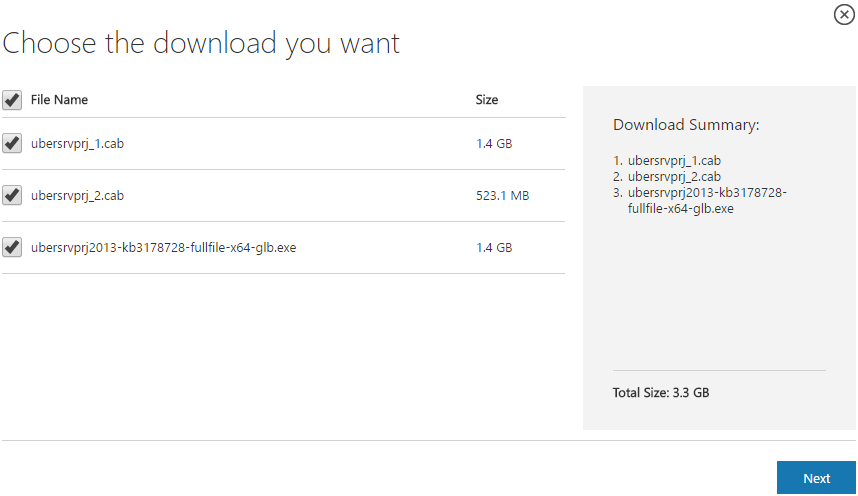
SharePoint 2013 CU – KB articles describing the CU:
- KB 3178727 – SharePoint Foundation 2013 April 2017 CU
- KB 3178730 – SharePoint Server 2013 April 2017 CU
- KB 3178728 – SharePoint Server 2013 with Project Server April 2017 CU
- KB 3178725 – Office Web Apps Server 2013 April 2017 CU
SharePoint 2013 CU – CU download link:
- Download SharePoint Foundation 2013 April 2017 CU
- Download SharePoint Server 2013 April 2017 CU
- Download Project Server 2013 April 2017 CU
- Download Office Web Apps Server 2013 April 2017 CU
After installation, remember to run the SharePoint 2013 Products Configuration Wizard, or:
PSConfig.exe -cmd upgrade -inplace b2b -wait -cmd applicationcontent -install -cmd installfeatures -cmd secureresources -cmd services -install
Important
Before installing the CU, ensure SP1 is already installed.
Installation may take up to five hours, so I recommend reading: Speeding up CU and SP installation on SharePoint 2013.
If your farm's patch level is earlier than July 2015 CU, run PSCONFIG immediately after installing the CU to update the schema of certain search databases. More at:
https://blogs.technet.microsoft.com/stefan_gossner/2015/07/15/important-psconfig-is-mandatory-for-july-2015-cu-for-sharepoint-2013
Always install only the CU matching your product version on a SharePoint 2013 farm.
The Project Server 2013 CU already includes:
- CU SharePoint Server 2013
- CU SharePoint Foundation 2013.
The SharePoint Server 2013 CU already includes:
- CU SharePoint Foundation 2013
Remember to update Distributed Cache as well as SharePoint; see How to update Distributed Cache correctly.
Included fixes and improvements
This CU includes the following fixes and improvements.
SharePoint Foundation 2013
- After you set work hours in the user profile, the calendar list does not display work hours as expected.
- Assume that you access a calendar that’s set up to show the site member’s schedules. When you resolve a user other than yourself in the people picker, the Connect to Outlook ribbon button isn’t enabled.
- A screen reader can’t identify the header of the Issues List column because there is no alternate text for it.
- The date and time inputs of a date time field had incorrect labels in the edit form.
- Hyperlink and Picture field controls are loosely associated with the column name. This causes difficult associating fields for screen reader users.
- Storage metrics recalculation may fail.
- After you install December 6, 2016, update for Project 2013 (KB3127978), DataForm web parts that use lists as data source can’t be displayed.
- You can’t use Office Web Application to open a document in SharePoint Server 2013 if the document path contains a space.
SharePoint Server 2013
- Query completions aren’t updated with new queries.
- For remote SharePoint calls in hybrid, the query rewrite in the result source is added to the query for two times. This could lead to an unexpected recall for custom query rewrites.
- Translates some terms in multiple languages to make sure that the meaning is accurate.
Project Server 2013
- You have a required custom field with a lookup table and with a default value defined. When you create a project through a project detail page, the custom field isn’t pre-filled with the default value. Instead, you have to select a value from the dropdown manually.
- Screen readers don’t identify that the Delegate Name and the User Name fields on the Add Delegation page are required.
- On the Manage Queue Jobs page, the dates in the From and To in the Job History section don’t work as expected. For example, you may not be able to set a date in order to see jobs from previous days.
Komentáře