


A new cumulative update has been released for SharePoint 2013 (May 2018 CU)
This CU fixes all SharePoint 2013 products.
SP Build: 15.0.5031.1000
This CU is a full update (Uber package), requiring no earlier updates apart from SP1.
The CU includes all SharePoint 2013 security fixes released since SP1. It does not include SP1, which is required to install this CU.
Because of its size, the CU is split into separate CAB files and one executable. Download all these files into the same installation folder before starting the update.
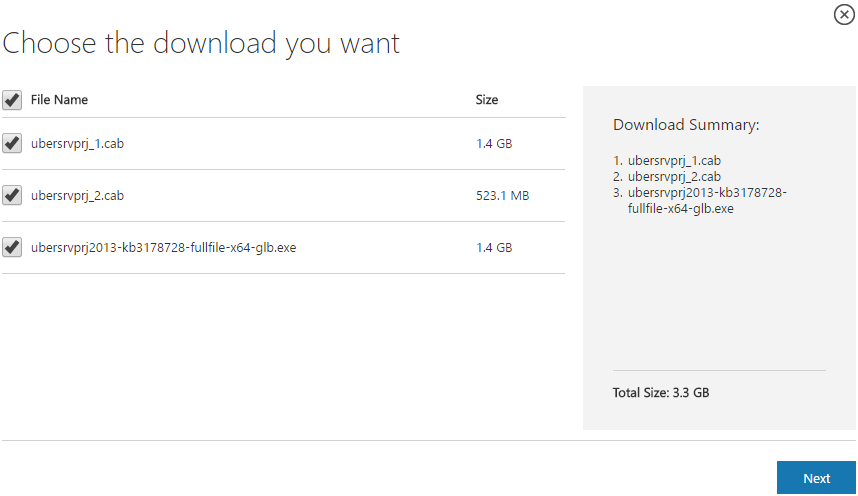
SharePoint 2013 CU – KB articles describing the CU:
- KB 4018394 – SharePoint Foundation 2013 May 2018 CU
- KB 4018397 – SharePoint Server 2013 May 2018 CU
- KB 4018395 – Project Server 2013 May 2018 CU
- KB 4018393 – Office Web Apps Server 2013 in May 2018 CU
SharePoint 2013 CU – CU download link:
- Download SharePoint Foundation 2013 May 2018 CU
- Download SharePoint Server 2013 May 2018 CU
- Download Project Server 2013 May 2018 CU
- Download Office Web Apps Server 2013 May 2018 CU
After installation, remember to run the SharePoint 2013 Products Configuration Wizard, or:
PSConfig.exe -cmd upgrade -inplace b2b -wait -cmd applicationcontent -install -cmd installfeatures -cmd secureresources -cmd services -install
Important
Before installing the CU, ensure SP1 is already installed.
Installation may take up to five hours, so I recommend reading: Speeding up CU and SP installation on SharePoint 2013.
If your farm's patch level is earlier than July 2015 CU, run PSCONFIG immediately after installing the CU to update the schema of certain search databases. More at:
https://blogs.technet.microsoft.com/stefan_gossner/2015/07/15/important-psconfig-is-mandatory-for-july-2015-cu-for-sharepoint-2013
Always install only the CU matching your product version on a SharePoint 2013 farm.
The Project Server 2013 CU already includes:
- CU SharePoint Server 2013
- CU SharePoint Foundation 2013.
The SharePoint Server 2013 CU already includes:
- CU SharePoint Foundation 2013
Remember to update Distributed Cache as well as SharePoint; see How to update Distributed Cache correctly.
Included fixes and improvements
This CU includes the following fixes and improvements.
SharePoint Foundation 2013
This security update resolves vulnerabilities in Microsoft Office that could allow remote code execution if a user opens a specially crafted Office file. To learn more about these vulnerabilities, see Microsoft Common Vulnerabilities and Exposures CVE-2018-8155.
This security update contains improvements and fixes for the following nonsecurity issues:
- After you install the security update for SharePoint Foundation 2013 (KB3172540), SharePoint Server 2013 is in an inconsistent state.
- Assume that you enable McAfee Security for SharePoint Server 2013. When you access a large OneNote file that has an attachment in SharePoint Server 2013, an application pool crashes intermittently.
- When a view has a Totals row for any columns and the Tabular View disabled, the Totals row is misaligned and the totals don’t appear under the appropriate column.
SharePoint Server 2013
This security update resolves vulnerabilities in Microsoft Office that could allow remote code execution if a user opens a specially crafted Office file. To learn more about these vulnerabilities, see the following Microsoft security advisories:
- Microsoft Common Vulnerabilities and Exposures CVE-2018-8149
- Microsoft Common Vulnerabilities and Exposures CVE-2018-8161
- Microsoft Common Vulnerabilities and Exposures CVE-2018-8168
This security update contains improvements and fixes for the following nonsecurity issue:
- This update improves Swiss translation.
Project Server 2013
This security update resolves vulnerabilities in Microsoft Office that could allow remote code execution if a user opens a specially crafted Office file. To learn more about these vulnerabilities, see Microsoft Common Vulnerabilities and Exposures CVE-2018-8156.
This security update contains improvements and fixes for the following nonsecurity issues:
- After you publish a project plan, you look at the Manage Queue Jobs page and find that the ManagedModeTaskSynchronization job has failed, and you see error details similar to the following:
GeneralQueueJobFailed (26000) – ManagedModeTaskSynchronization.SynchronizeTaskListInManagedModeMessage.
- The title on a Project Detail Page shows the “&” (ampersand) character displayed as “&”.
- When you try to open a project from the Project Center while using Internet Explorer 11 in Windows 7, you receive the following error message:
Action Not available. Project Professional needs to be installed to open the project. Install project and try again.
- Status managers see the following error message in the status updates history page:
_error loading
- Consider the following scenario:
- As a team member, you open your timesheet and enter work for two adjacent days.
- On the first day, you set the actual work value back to zero.
- On the first day, you set 8 hours of non-working time on an administrator task (for example, vacation)
- You send a status update for approval.
- You open the previous week timesheet.
- You enter actual work values.
- You send the timesheet for approval, and the status manager approves it.
In this case, the actual work entered on the second of the two days moves to the first day. The actual work should not move when the status update is applied to the project.
- This update fixes the CRTL+S keyboard shortcut save functionality on Project Detail Pages for the Arabic, Finish, and Portuguese versions.
Office Web Apps Server 2013
This security update resolves vulnerabilities in Microsoft Office that could allow remote code execution if a user opens a specially crafted Office file. To learn more about these vulnerabilities, see Microsoft Common Vulnerabilities and Exposures CVE-2018-8161.
Komentáře