


A new cumulative update has been released for SharePoint 2013 (February 2018 CU)
This CU fixes all SharePoint 2013 products.
SP Build: 15.0.5007.1000
This CU is a full update (Uber package), requiring no earlier updates apart from SP1.
The CU includes all SharePoint 2013 security fixes released since SP1. It does not include SP1, which is required to install this CU.
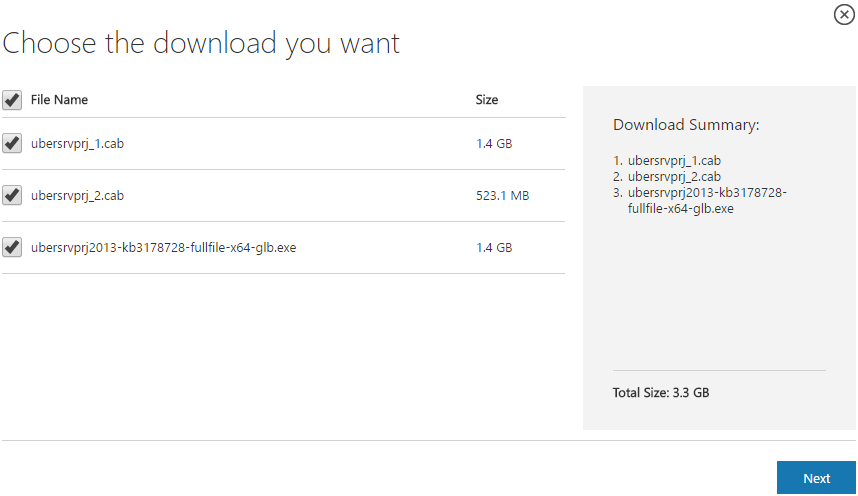
Because of its size, the CU is split into separate CAB files and one executable. Download all these files into the same installation folder before starting the update.
SharePoint 2013 CU – KB articles describing the CU:
- KB 4011693 – SharePoint Foundation 2013 February 2018 CU
- KB 4011696 – SharePoint Server 2013 February 2018 CU
- KB 4011694 – Project Server 2013 February 2018 CU
- No Office Web Apps Server 2013 update was released with this CU
SharePoint 2013 CU – CU download link:
- Download SharePoint Foundation 2013 February 2018 CU
- Download SharePoint Server 2013 February 2018 CU
- Download Project Server 2013 February 2018 CU
- No Office Web Apps Server 2013 update was released with this CU
After installation, remember to run the SharePoint 2013 Products Configuration Wizard, or:
PSConfig.exe -cmd upgrade -inplace b2b -wait -cmd applicationcontent -install -cmd installfeatures -cmd secureresources -cmd services -install
Important
Before installing the CU, ensure SP1 is already installed.
Installation may take up to five hours, so I recommend reading: Speeding up CU and SP installation on SharePoint 2013.
If your farm's patch level is earlier than July 2015 CU, run PSCONFIG immediately after installing the CU to update the schema of certain search databases. More at:
https://blogs.technet.microsoft.com/stefan_gossner/2015/07/15/important-psconfig-is-mandatory-for-july-2015-cu-for-sharepoint-2013
Always install only the CU matching your product version on a SharePoint 2013 farm.
The Project Server 2013 CU already includes:
- CU SharePoint Server 2013
- CU SharePoint Foundation 2013.
The SharePoint Server 2013 CU already includes:
- CU SharePoint Foundation 2013
Remember to update Distributed Cache as well as SharePoint; see How to update Distributed Cache correctly.
Included fixes and improvements
This CU includes the following fixes and improvements.
SharePoint Foundation 2013
This update fixes the following issue:
- A SharePoint user who has permissions to add applications to a site can elevate permissions when you validate the user’s permission in the UI layer.
This update also contains the following improvements:
- Makes the out-of-the-box search verticals appear in Search Settings so that the verticals can be changed even after you have added the custom search verticals.
- Adds support for subsites to inherit the search verticals from their parent sites. This enables you to set an option at the top of the verticals box to inherit verticals from the parent site.
SharePoint Server 2013
This update contains the following improvements:
- Translates some terms in multiple languages to make sure that the meaning is accurate.
Project Server 2013
- Consider the following scenario:
- You have a task that has a resource assigned.
- The task has a split in it. For example, there is a week of work, a week that has no work, and then a final week that has work.
- In the timesheet for this task, you enter hours on the task so that the work is completed up to the date where the split begins.
- The timesheet is submitted, and then the status update is approved.
- After that, the project is opened in Project Web App, and the task finish date is adjusted to a date that’s after the actual work is completed. For example, the actual finish date is set to the middle of the week where there is no work.
In this situation, the actual work is spread over the whole duration.
- Consider the following scenario:
- You have a Project Web App site and Project Professional 2013 in your organization.
- You create some custom project fields and add them to your project detail pages (PDPs).
- In Project Web App, you create a new project and add values for these custom fields.
- You open the project in Project Professional 2013, make a change, and then save the project.
- You open the project in Project Web App and view the custom field values on the PDPs.
In this situation, the values for these custom fields may be lost.
Komentáře