


A new cumulative update has been released for SharePoint 2013 (December 2017 CU)
This CU fixes all SharePoint 2013 products.
SP Build: 15.0.4989.1001
This CU is a full update (Uber package), requiring no earlier updates apart from SP1.
The CU includes all SharePoint 2013 security fixes released since SP1. It does not include SP1, which is required to install this CU.
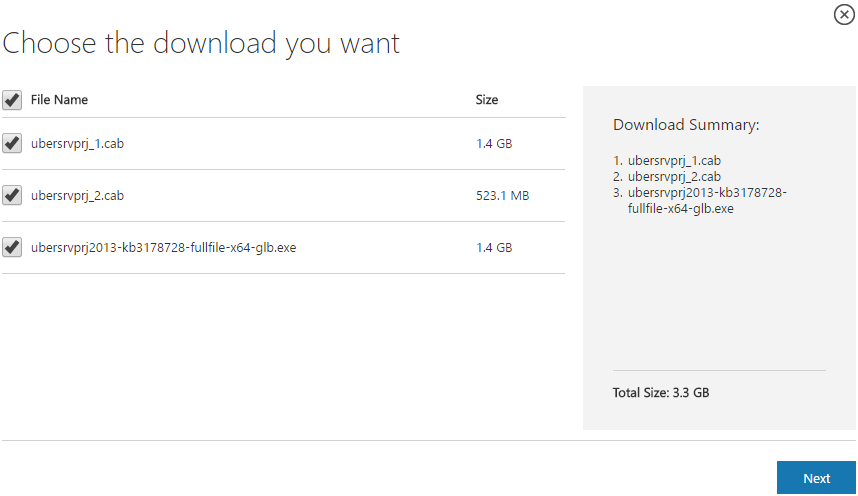
Because of its size, the CU is split into separate CAB files and one executable. Download all these files into the same installation folder before starting the update.
SharePoint 2013 CU – KB articles describing the CU:
- KB 4011588 – SharePoint Foundation 2013 December 2017 CU
- KB 4011593 – SharePoint Server 2013 December 2017 CU
- KB 4011589 – Project Server 2013 December 2017 CU
- KB 4011587 – Office Web Apps Server 2013 December 2017 CU
SharePoint 2013 CU – CU download link:
- Download SharePoint Foundation 2013 December 2017 CU
- Download SharePoint Server 2013 December 2017 CU
- Download Project Server 2013 December 2017 CU
- Download Office Web Apps Server 2013 December 2017 CU
After installation, remember to run the SharePoint 2013 Products Configuration Wizard, or:
PSConfig.exe -cmd upgrade -inplace b2b -wait -cmd applicationcontent -install -cmd installfeatures -cmd secureresources -cmd services -install
Important
Before installing the CU, ensure SP1 is already installed.
Installation may take up to five hours, so I recommend reading: Speeding up CU and SP installation on SharePoint 2013.
If your farm's patch level is earlier than July 2015 CU, run PSCONFIG immediately after installing the CU to update the schema of certain search databases. More at:
https://blogs.technet.microsoft.com/stefan_gossner/2015/07/15/important-psconfig-is-mandatory-for-july-2015-cu-for-sharepoint-2013
Always install only the CU matching your product version on a SharePoint 2013 farm.
The Project Server 2013 CU already includes:
- CU SharePoint Server 2013
- CU SharePoint Foundation 2013.
The SharePoint Server 2013 CU already includes:
- CU SharePoint Foundation 2013
Remember to update Distributed Cache as well as SharePoint; see How to update Distributed Cache correctly.
Included fixes and improvements
This CU includes the following fixes and improvements.
SharePoint Foundation 2013
This update fixes the following issues:
- You cannot open the documents that you have view-only permission in Office Web applications, even if you have set to open the documents in desktop clients. Additionally, you receive the following denied error message:
Sorry, this site hasn’t been shared with you
- The values of the Issue ID field are missing when you edit an issue tracking list in Quick Edit mode.
- In the conversation section of a pending access request, the date and time are displayed in the wrong time zone.
- You cannot create a site in SharePoint Foundation 2013 after you install the October 10, 2017, cumulative update for SharePoint Foundation 2013 (KB4011173).
This update also has the following improvements:
- Enables the new Document Information Panel feature that’s visible in Word 2013.
- Changes the short names of the services that are using a built-in service account into display names so that it’s easy to understand what service is described in the SharePoint health rules report.
- Improves the following Health Analyzer rules:
- Renames the following two Health Analyzer rules titles for better wording:
- “Health Analyzer: Some health analyzer rules do not have associated timer jobs” is renamed to “Health Analyzer: Some Health Analyzer rules are enabled but do not have any associated timer jobs”.
- “Health Analyzer: Databases exist on servers running SharePoint Foundation” is renamed to “Health Analyzer: Databases exist on servers running SharePoint”.
- Removes the following five Health Analyzer rules to reduce noise:
- Health Analyzer: Database has large amounts of unused space
- Health Analyzer: Alternate access URLs have not been configured
- Health Analyzer: People search relevance is not optimized when the Active Directory has errors in the manager reporting structure
- Health Analyzer: Search – One or more crawl databases may have fragmented indices
- Health Analyzer: Validate the My Site Host and individual My Sites are on a dedicated Web application and separate URL domain
- Improves the SharePoint Health Analyzer algorithm that checks the free space in drives to handle large drives better. The algorithm will now report a warning if the free disk space is less than 10 GB, or report an error if the free disk space is less than 4 GB.
- Renames the following two Health Analyzer rules titles for better wording:
SharePoint Server 2013
This update fixes the following issues:
- You cannot move any child terms if the parent term is pinned on another term set in a SharePoint Term Store, and you receive the following error message:
This operation cannot be completed. The term store may be unavailable.
- When you search Chinese-Simplified or Chinese-Traditional content in SharePoint 2013, you may not see the relevant results, or the query keywords may not be highlighted in the results. This issue occurs because the search falls back to the English word breaker when the query is Chinese-Simplified or Chinese-Traditional based. This update resolves the issue so that the correct word breaker is selected.
- The visual focus is lost when you navigate a video content by using the keyboard.
- Page scrolls up automatically when you edit a publishing page and try to click a link in a web part.
- Assume that you enable caching for the Content Search Web Part (CSWP). When you search for content by using a query that contains a specific type parameter, the query fails, and you receive the following error message:
Specified method is not supported.
- When you click the link of My Task list in your personal site, it points to the default URL zone of the Alternate Access Mapping (AAM) unexpectedly.
- When you edit a publishing page and then select the Save and Continue Editing option, it pops up an unexpected message that states “Are you sure you want to leave this page?” After you install this update, the message will be removed.
- This update fixes an issue in which the top report part of the Search Reports counts the same queries incorrectly with different casing. For example, “query”, “QUERY” and “Query” are treated as unique query texts and counted accordingly. This update lowercases the query text before calculating the counts.
- The fractional number and data time values in shared columns of documents that are contained in document sets are displayed incorrectly when the document properties are saved under non-English regional settings, such as Dutch.
This update also has the following improvements:
-
- Adds more logging to log what failure occurs and throw an exception to fail the query when the custom security trimmer initialization fails.
- Improves the Thailand word breaker for complex compound words when you search in SharePoint.
Project Server 2013
This update fixes the following issues:
- Actual work that’s been reported by team members in a project inadvertently gets spread differently from what was reported. For example, the actual work hours of 2, 2, 2, 2 are changed to 1.78, 1.78, 1.78, 2.45; the totals stay the same but appear differently across the days. This issue occurs in certain situations when the project is edited in Project Web App even though the Only allow task updates via Tasks and Timesheets task setting and display server option is enabled.
- After an administrative time category name is changed, the new name isn’t always used when you create new timesheets.
- Time phased planned work values don’t display on a timesheet when the Task Settings and Display Reporting Display option is set to “Resources should report their total hours worked for a week”.
- When you delete a value from a custom field that’s configured to display a graphical indicator, the record in the database is not deleted, instead the value is set to NULL and the indicator value is preserved in reporting.
- Consider the following scenario:
- A project manager publishes a task to a team member.
- The team member goes to her or his timesheet and enters actual work on the task.
- The timesheet is submitted and then approved.
- The project in which the task exists is deleted.
- The team member goes back to their timesheet.
In this situation, the task on which the actual work was submitted is no longer there.
Office Web Apps Server 2013
This update fixes the following issues:
- Assume that you have inserted the SaveDate field through Quick Parts in a Word document. In this situation, when you view the document in Word Online Viewer, the SaveDate field reports the current server time instead of the last time that the document was saved.
- When you view documents and then click the hyperlinks that contain certain characters (such as Hebrew and Arabic language) in the Word Online Viewer, the hyperlinks don’t work.
Komentáře