


Installing SharePoint 2013 farm updates takes considerable time: hours, not minutes.
Service applications such as Search and AppFabric consume substantial CPU time, leaving little for the update process. Updates have also grown larger than the product itself: the SharePoint Server 2013 with SP1 installation ISO is 2.62 GB, while January 2016 CU is 3.1 GB.
Combining that update size with CPU-hungry service applications explains why updating one server took several hours.
What can be done?
Stop selected SharePoint 2013 services and service applications, ideally using one PowerShell script that stops them, installs the update and starts them again.
I particularly like Russ Maxwell's PowerShell script, which addresses the problem comprehensively.
More information: Why SharePoint 2013 Cumulative Update takes 5 hours to install?
Using the script is simple: save it alongside the downloaded update and run it.
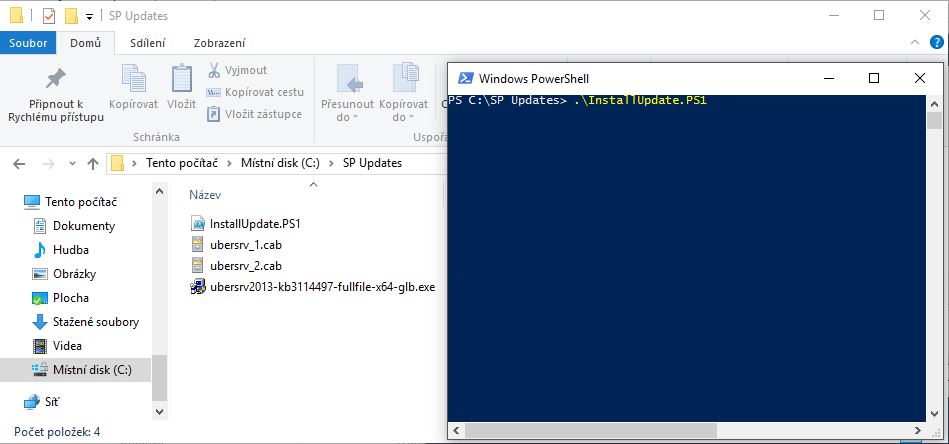
How does it work?
- Stops IISAdmin and SPTimerV4 (IIS)
- Stops/pauses Search (as selected)
- Installs updates in passive mode (without user interaction)
- Starts IISAdmin and SPTimerV4 (IIS)
- Starts Search
PowerShell scrip
###########################
##Ensure Patch is Present##
###########################
$patchfile = Get-ChildItem | where{$_.Extension -eq ".exe"}
if($patchfile -eq $null)
{
  Write-Host "Unable to retrieve the file.  Exiting Script" -ForegroundColor Red
  Return
}

########################
##Stop Search Services##
########################
##Checking Search services##
$srchctr = 1
$srch4srvctr = 1
$srch5srvctr = 1

$srv4 = get-service "OSearch15"
$srv5 = get-service "SPSearchHostController"

If(($srv4.status -eq "Running") -or ($srv5.status-eq "Running"))
  {
    Write-Host "Choose 1 to Pause Search Service Application" -ForegroundColor Cyan
    Write-Host "Choose 2 to leave Search Service Application running" -ForegroundColor Cyan
    $searchappresult = Read-Host "Press 1 or 2 and hit enter"
    Write-Host


   if($searchappresult -eq 1)
    {
        $srchctr = 2
        Write-Host "Pausing the Search Service Application" -foregroundcolor yellow
        Write-Host "This could take a few minutes" -ForegroundColor Yellow
        $ssa = get-spenterprisesearchserviceapplication
        $ssa.pause()
    }


    elseif($searchappresult -eq 2)
    {
        Write-Host "Continuing without pausing the Search Service Application"
    }
    else
    {
        Write-Host "Run the script again and choose option 1 or 2" -ForegroundColor Red
        Write-Host "Exiting Script" -ForegroundColor Red
        Return
    }
  }

Write-Host "Stopping Search Services if they are running" -foregroundcolor yellow
if($srv4.status -eq "Running")
  {
    $srch4srvctr = 2
    set-service -Name "OSearch15" -startuptype Disabled
    $srv4.stop()
  }

if($srv5.status -eq "Running")
  {
    $srch5srvctr = 2
    Set-service "SPSearchHostController" -startuptype Disabled
    $srv5.stop()
  }

do
  {
    $srv6 = get-service "SPSearchHostController"
    if($srv6.status -eq "Stopped")
    {
        $yes = 1
    }
    Start-Sleep -seconds 10
  }
  until ($yes -eq 1)

Write-Host "Search Services are stopped" -foregroundcolor Green
Write-Host


#######################
##Stop Other Services##
#######################
Set-Service -Name "IISADMIN" -startuptype Disabled
Set-Service -Name "SPTimerV4" -startuptype Disabled
Write-Host "Gracefully stopping IIS W3WP Processes" -foregroundcolor yellow
Write-Host
iisreset -stop -noforce
Write-Host "Stopping Services" -foregroundcolor yellow
Write-Host

$srv2 = get-service "SPTimerV4"
  if($srv2.status -eq "Running")
  {$srv2.stop()}

Write-Host "Services are Stopped" -ForegroundColor Green
Write-Host
Write-Host


##################
##Start patching##
##################
Write-Host "Patching now keep this PowerShell window open" -ForegroundColor Magenta
Write-Host
$starttime = Get-Date

$filename = $patchfile.basename

Start-Process $filename

Start-Sleep -seconds 20
$proc = get-process $filename
$proc.WaitForExit()

$finishtime = get-date
Write-Host
Write-Host "Patch installation complete" -foregroundcolor green
Write-Host


##################
##Start Services##
##################
Write-Host "Starting Services Backup" -foregroundcolor yellow
Set-Service -Name "SPTimerV4" -startuptype Automatic
Set-Service -Name "IISADMIN" -startuptype Automatic

##Grabbing local server and starting services##
$servername = hostname
$server = get-spserver $servername

$srv2 = get-service "SPTimerV4"
$srv2.start()
$srv3 = get-service "IISADMIN"
$srv3.start()
$srv4 = get-service "OSearch15"
$srv5 = get-service "SPSearchHostController"

###Ensuring Search Services were stopped by script before Starting"
if($srch4srvctr -eq 2)
{
    set-service -Name "OSearch15" -startuptype Automatic
    $srv4.start()
}
if($srch5srvctr -eq 2)
{
    Set-service "SPSearchHostController" -startuptype Automatic
    $srv5.start()
}

###Resuming Search Service Application if paused###
if($srchctr -eq 2)
{
    Write-Host "Resuming the Search Service Application" -foregroundcolor yellow
    $ssa = get-spenterprisesearchserviceapplication
    $ssa.resume()
}

Write-Host "Services are Started" -foregroundcolor green
Write-Host
Write-Host
Write-Host "Script Duration" -foregroundcolor yellow
Write-Host "Started: " $starttime -foregroundcolor yellow
Write-Host "Finished: " $finishtime -foregroundcolor yellow
Write-Host "Script Complete"
PowerShell script taken from: https://blogs.msdn.microsoft.com/russmax/2013/04/01/why-sharepoint-2013-cumulative-update-takes-5-hours-to-install
Komentáře