


Using SRV records to locate a suitable domain controller when starting a local workstation (laptop) that moves between branch offices in a single domain.
At startup, while services are starting (specifically NETLOGON), each workstation sends a query to find and contact the appropriate DC for its network (subnet), through which domain users can later authenticate. The DC discovery process first contacts the last-used DC. If it is unavailable or in a different subnet, the workstation searches for a DC within or closest to its own subnet. This ensures that the workstation communicates with a DC in the same network even as it travels between branch offices and their DCs.
How does a client (workstation) find its domain controller?
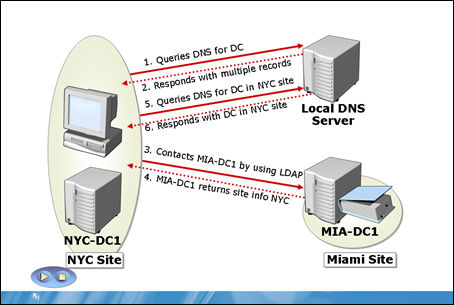
- After NETLOGON starts, the workstation attempts to contact the last-used DC
- If that DC is unavailable, the workstation queries DNS for the IP addresses of available DCs and analyses its own IP address to try to contact the nearest DC.
- If the contacted DC is available, it returns the following information based on the workstation's IP address:
- the name of the site containing or closest to the workstation
- the name of the site containing the responsible DC
- Step 3 may repeat until the workstation finds a responsible DC in the same subnet or closest to the workstation.
Komentáře