


A new cumulative update has been released for SharePoint 2013 (November 2017 CU)
This CU fixes all SharePoint 2013 products.
SP Build: 15.0.4981.1002
This CU is a full update (Uber package), requiring no earlier updates apart from SP1.
The CU includes all SharePoint 2013 security fixes released since SP1. It does not include SP1, which is required to install this CU.
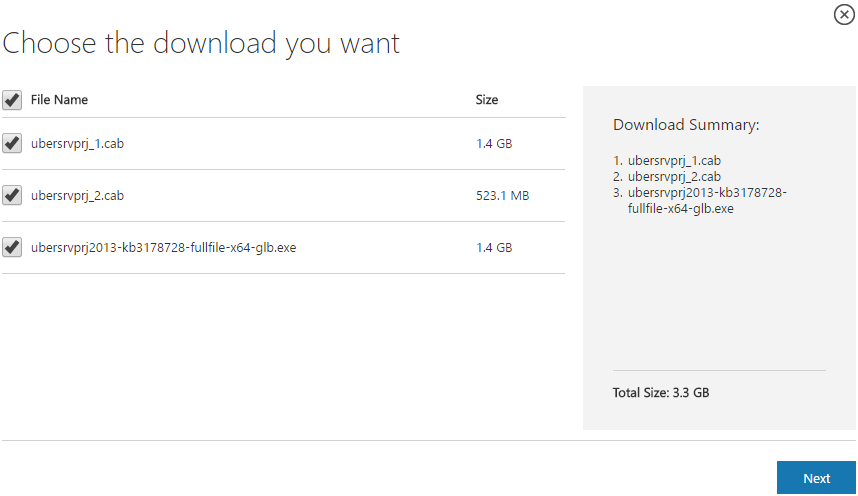
Because of its size, the CU is split into separate CAB files and one executable. Download all these files into the same installation folder before starting the update.
SharePoint 2013 CU – KB articles describing the CU:
- KB 4011248 – SharePoint Foundation 2013 November 2017 CU
- KB 4011251 – SharePoint Server 2013 November 2017 CU
- KB 4011249 – Project Server 2013 November 2017 CU
- KB 4011247 – Office Web Apps Server 2013 November 2017 CU
SharePoint 2013 CU – CU download link:
- Download SharePoint Foundation 2013 November 2017 CU
- Download SharePoint Server 2013 November 2017 CU
- Download Project Server 2013 November 2017 CU
- Download Office Web Apps Server 2013 November 2017 CU
After installation, remember to run the SharePoint 2013 Products Configuration Wizard, or:
PSConfig.exe -cmd upgrade -inplace b2b -wait -cmd applicationcontent -install -cmd installfeatures -cmd secureresources -cmd services -install
Important
Before installing the CU, ensure SP1 is already installed.
Installation may take up to five hours, so I recommend reading: Speeding up CU and SP installation on SharePoint 2013.
If your farm's patch level is earlier than July 2015 CU, run PSCONFIG immediately after installing the CU to update the schema of certain search databases. More at:
https://blogs.technet.microsoft.com/stefan_gossner/2015/07/15/important-psconfig-is-mandatory-for-july-2015-cu-for-sharepoint-2013
Always install only the CU matching your product version on a SharePoint 2013 farm.
The Project Server 2013 CU already includes:
- CU SharePoint Server 2013
- CU SharePoint Foundation 2013.
The SharePoint Server 2013 CU already includes:
- CU SharePoint Foundation 2013
Remember to update Distributed Cache as well as SharePoint; see How to update Distributed Cache correctly.
Included fixes and improvements
This CU includes the following fixes and improvements.
SharePoint Foundation 2013
This update fixes the following issues:
- After you install the October 10, 2017, cumulative update for SharePoint Enterprise Server 2013 (KB4011177), you cannot create sites in SharePoint Server 2013 if there’s no User Profile service application configured.
- Web Part Adder panels and panels entries are not accessible for a screen reader. This update improves the accessibility for Web Part Adder.
- If a SharePoint calendar list is connected to an Exchange calendar and the Exchange hardening mode is turned on, the calendar in SharePoint stops working.
- A screen reader displays the label of an Edit Control Block (ECB) shortcut menu as “Undefined Open Menu” instead of “<Item Title or Name> Open Menu“.
- The long non-US-ASCII filenames are truncated after you download the file from SharePoint.
- The Email a Link function on the ribbon produces an incorrect URL in the email body. This issue occurs after you install the update KB3191914 for a SharePoint 2013 farm.
- When you try to insert a reusable content into a page and navigate into a folder in the reusable content UI, the UI only refreshes but doesn’t navigate to anywhere.
- If you open and make some changes to a document from SharePoint Server 2013 by using Office Online Server, the changes aren’t saved.
- When you access a term and the Term-Driven Page with Friendly URLs option is checked in SharePoint, you receive a “Page Not Found” error if the URL contains an ampersand (&) character.
- Assume that you have Microsoft Office Web Apps Server 2013 installed. In the on-premises version of Microsoft Office Word Online 2013 and Microsoft Office PowerPoint Online 2013, decimal values are truncated unexpectedly in a chart axis or data label.
This update also has the following improvements:
- This update changes the following Health Analyzer rules:
- Health Analyzer: Accounts used by application pools or service identities are in the local machine Administrators group (SharePoint Server)
- Health Analyzer: Databases running in compatibility range, upgrade recommended (SharePoint Server)
- Health Analyzer: Databases exist on servers running SharePoint Foundation (SharePointServer)
After you install this update, by default these three rules will be set from ON to OFF, unless you have configured the rules or made changes to the rules.
- This update corrects a word wrap for ProvideLoadKey (PLK) property for the Polish version of SharePoint Server 2013.
- Timer job will store latest 10000 job records instead of 7 days job history in the TimerJobHistory table so that the records will not take too many disk space.
SharePoint Server 2013
- Pages in a structured navigation are sorted incorrectly when you use automatic sorting.
- Some files (.docx) that are indexed by search and parsed by using IFilters are not searchable or discoverable. This issue occurs because tab characters are ignored, and texts are concatenated without proper spaces between them.
- When you create a search alert on a SharePoint site that’s not a search center, the GO TO SEARCH RESULT link in the alert email is broken, and you receive the following error message:
Page not found – The page your’re looking for doesn’t exist
- A word typo for the German version of SharePoint Server 2013.
- This security update resolves vulnerabilities in Microsoft Office that could allow remote code execution if a user opens a specially crafted Office file. To learn more about these vulnerabilities, see Microsoft Common Vulnerabilities and Exposures ADV170020.
Project Server 2013
- Assume that you have Office Web Apps Server 2013 installed. In the on-premises version of Microsoft Word Online and Microsoft PowerPoint Online, decimal values are truncated in a chart axis or data label.
- After you change the SharePoint farm authentication realm, Project Server workflows stop progressing and go into suspended mode.
- If you don’t have permission to approve a timesheet, the browse button in the Confirm Approval dialog displays the following message:
<%<%$Resource:PWA.ADMIN_ADDMODIFYUSER_BROWSE%>>
-
If the previous publish failed, the publish of the master project is blocked.
Web Apps Server 2013
- This security update resolves vulnerabilities in Microsoft Office that could allow remote code execution if a user opens a specially crafted Office file. To learn more about these vulnerabilities, see Microsoft Common Vulnerabilities and Exposures ADV170020.
- Assume that you have Office Web Apps Server 2013 installed. In the on-premises version of Microsoft Word Online and Microsoft PowerPoint Online, decimal values are truncated in a chart axis or data label.
Komentáře