


A new cumulative update has been released for SharePoint 2013 (June 2017 CU)
This CU fixes all SharePoint 2013 products.
SP Build: 15.0.4937.1000
This CU is a full update (Uber package), requiring no earlier updates apart from SP1.
The CU includes all SharePoint 2013 security fixes released since SP1. It does not include SP1, which is required to install this CU.
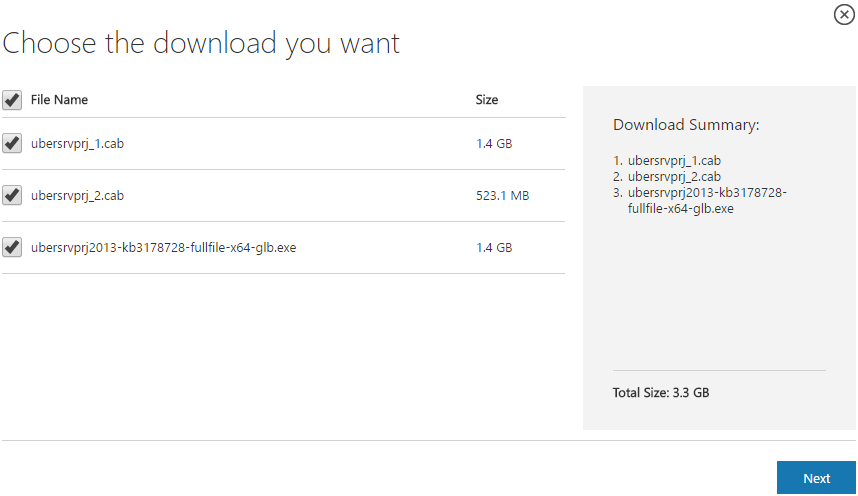
Because of its size, the CU is split into separate CAB files and one executable. Download all these files into the same installation folder before starting the update.
SharePoint 2013 CU – KB articles describing the CU:
- KB 3203428 – SharePoint Foundation 2013 June 2017 CU
- KB 3203430 – SharePoint Server 2013 June 2017 CU
- KB 3203429 – SharePoint Server 2013 with Project Server June 2017 CU
- KB 3203391 – Office Web Apps Server 2013 June 2017 CU
SharePoint 2013 CU – CU download link:
- Download SharePoint Foundation 2013 June 2017 CU
- Download SharePoint Server 2013 June 2017 CU
- Download Project Server 2013 June 2017 CU
- Download Office Web Apps Server 2013 June 2017 CU
After installation, remember to run the SharePoint 2013 Products Configuration Wizard, or:
PSConfig.exe -cmd upgrade -inplace b2b -wait -cmd applicationcontent -install -cmd installfeatures -cmd secureresources -cmd services -install
Important
Before installing the CU, ensure SP1 is already installed.
Installation may take up to five hours, so I recommend reading: Speeding up CU and SP installation on SharePoint 2013.
If your farm's patch level is earlier than July 2015 CU, run PSCONFIG immediately after installing the CU to update the schema of certain search databases. More at:
https://blogs.technet.microsoft.com/stefan_gossner/2015/07/15/important-psconfig-is-mandatory-for-july-2015-cu-for-sharepoint-2013
Always install only the CU matching your product version on a SharePoint 2013 farm.
The Project Server 2013 CU already includes:
- CU SharePoint Server 2013
- CU SharePoint Foundation 2013.
The SharePoint Server 2013 CU already includes:
- CU SharePoint Foundation 2013
Remember to update Distributed Cache as well as SharePoint; see How to update Distributed Cache correctly.
Included fixes and improvements
This CU includes the following fixes and improvements.
SharePoint Foundation 2013
- Assume that you select multiple documents in a folder in a document library, and then you select the Approve/Reject button on the ribbon. In this situation, the dialog box is stuck in a loading state. This issue occurs if you have limited (for example, View Only) permissions, and the folder that uses the classic SharePoint web UI has Approver-level permissions.
- Metadata navigation does not work for task lists.
- When you add new tasks to a project while editing a project in PWA, formulas that use the Now() or CurrentDate() function don’t work or calculate the correct result.
- You can’t edit items in quick edit mode in a document library with some items (more than two pages of files) that have the Edit function (the link to edit items) enabled. This issue occurs after you move to a different page of the items.
- Empty results are returned when you make a restful call (GetSubwebsFilteredForCurrentUser) to retrieve all sub web information.
- Improves the translation for the Delete Attachment function (Java Script) in multiple languages to make sure that the meaning is accurate.
SharePoint Server 2013
- This security update resolves vulnerabilities in Microsoft Office that could allow remote code execution if a user opens a specially crafted Office file. To learn more about these vulnerabilities, see Microsoft Common Vulnerabilities and Exposures CVE-2017-8509 and Microsoft Common Vulnerabilities and Exposures ADV170008.
- This security update resolves vulnerabilities in Microsoft Office that could allow remote code execution if a user opens a specially crafted Office file. To learn more about these vulnerabilities, see Microsoft Common Vulnerabilities and Exposures CVE-2017-8509, Microsoft Common Vulnerabilities and Exposures CVE-2017-8511, and Microsoft Common Vulnerabilities and Exposures CVE-2017-8512.
- This security update resolves vulnerabilities in Microsoft Office that could allow remote code execution if a user opens a specially crafted Office file. To learn more about these vulnerabilities, see Microsoft Common Vulnerabilities and Exposures CVE-2017-8511 and Microsoft Common Vulnerabilities and Exposures CVE-2017-8512.
Project Server 2013
- Suppose you go to the Project Center page in the Project Web app and select many projects. When you click the Open In Microsoft Project option, nothing seems to happen, and the expected master project isn’t created in Project Professional. Now, when you’ve selected more projects than can be used to create a master project via this method, you’ll see a message similar to this:Your selection exceeds the limit for the number of projects we can open at a time from Project Web App. We created a master project with the supported number of projects. You can then add additional projects by going through Insert Subproject.
- Added auditing capability to determine when and who changes the “Only allow tasks updates via Tasks and Timesheets” and tracking method Task Settings and Display server settings. When changes are made on the Task Settings and Display page, details are written to the ULS logs under the Project Server Administration category and look similar to these:
PWA:http://server/PWA, ServiceApp:Project Service Application, User:i:0#.w|domain\user, PSI: WS_ADMIN setting WADMIN_PROTECT_ACTUALS changed. New Value: 0. Old Value: 1. Resource Id: xxx
PWA:http://server/PWA, ServiceApp:Project Service Application, User:i:0#.w|domain\user, PSI: WS_ADMIN setting WADMIN_DEFAULT_TRACKING_METHOD changed. New Value: 1. Old Value: 2. Resource Id: xxx
- This update also fixes the following issues:
- Consider the following scenario:
- You have a series of tasks that are linked.
- Because of the way that the tasks are scheduled, the successor tasks don’t necessarily start and finish at the day boundaries. For example, start at 8:00 AM and finish at 5:00 PM.
- A resource is assigned to the tasks, and they are published.
- The resource completes the work on the tasks entering all actual work on a given date and sends the status update to the project manager for approval.
- The project manager approves the updates.
In this case, the start date of the given tasks may be different than what’s expected. For example, show an actual start time of 9:10 AM whereas in another case it may show 8:00 AM. This issue occurs because the order in which the status updates were applied was not consistent.
- Consider the following scenario:
- A project manager publishes a task to a team member.
- The team member in either a timesheet or in tasks within the Project Web app reports work that’s earlier than what was scheduled. For example, 8h of work was scheduled on Wednesday but 8h of actual work was reported and submitted for Monday.
- The status manager approves the update.
- The team member zeros out the actual work and moves it to a later date.
- The status manager approves the update.
- The project is opened in Project Server.
In this situation, the task’s actual start date still reflects the earlier update instead of the new update where the actual start date is later.
- When a Project server is processing a huge number of timesheets, the Reporting (Timesheet Save) jobs may fail. In the ULS logs, you may see an error similar to this:ReportingTimesheetSaveMessageFailed (24014) – A network-related or instance-specific error occurred while establishing a connection to SQL Server.
- After you close a project resource plan, the resource plan isn’t check in.
- The performance of the Approval Center PWA page is poor. This issue occurs after you install the January 12, 2016, update for Project Server 2013 (KB3114507).
- User generated (ad hoc) custom filters that are applied to PWA views don’t display data values. For example, you open a custom filter dialog box in Project Center to add a filter on a date column. After you save, close, and then reopen the dialog box, the date you set isn’t displayed.
- When you submit a status update, task-level baseline data disappears from the Tasks view for the given task assignments.
- Server-side defined timesheet view grouping doesn’t work with custom fields.
- Consider the following scenario:
To fix the following issue, install June 13, 2017, update for SharePoint Foundation 2013 (KB3203398).
When you add new tasks to a project while editing a project in PWA, formulas that use the Now() or CurrentDate() function don’t calculate the correct result.
Office Web Apps Server 2013
- This security update resolves vulnerabilities in Microsoft Office that could allow remote code execution if a user opens a specially crafted Office file. To learn more about these vulnerabilities, see Microsoft Common Vulnerabilities and Exposures CVE-2017-8509, Microsoft Common Vulnerabilities and Exposures CVE-2017-8511, and Microsoft Common Vulnerabilities and Exposures CVE-2017-8512.
Komentáře