


I encountered a decimal number display error while creating a new DispForm.aspx in SharePoint Designer: numbers stored with a decimal comma were not displayed. The Discount field was meant to display a percentage, so entering 10% automatically converted it to 0,1. The problem is the Czech language environment (Czech language pack), which stores the value with a comma (0,1) rather than a decimal point (0.1), then cannot read it back. This occurred on SharePoint Services 3 SP2 with all current updates, so another workaround was needed.
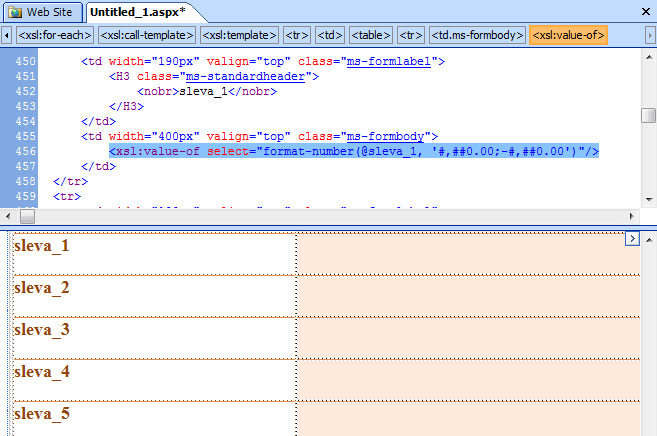
What happened? Displaying a stored 10% value in a Czech environment
If you let SharePoint Designer create a new DispForm.aspx, it automatically generates a formula to display the numeric value as a percentage. But because the decimal value (0,1) is stored with a comma, nothing appears; see Figure 1. This is the formula generated by SD.
As mentioned, the problem is the stored comma. First convert the value by replacing the comma with a point, using translate. The formula then looks like this:
The number now appears, but as 0.1 rather than the required percentage, so make one more change to the formula as follows:
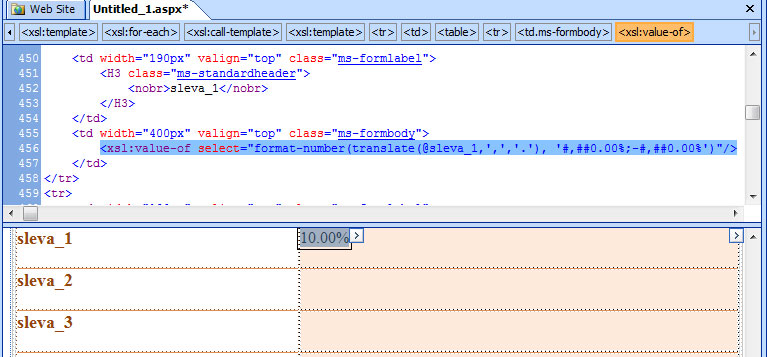
The value is now displayed correctly as 10 %
Komentáře