


AD sites and site links define the physical network structure, allowing replication to reflect connection speeds where DCs are located. Sites and subnets also let workstations determine their current location and nearest DC. For example, a computer moved from New York to Czech Republic can detect from its assigned IP address that it is in a different subnet, belonging to another site with different DCs.
How AD DS sites and site links work.
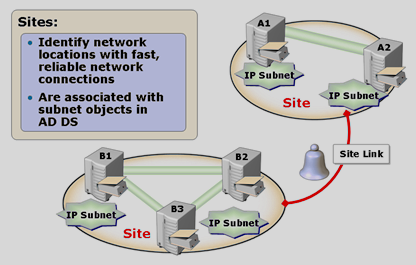
AD sites
define a network structure comprising potentially several subnets in one site. Replication within a site is uncompressed and spans the entire site, assuming fast LAN connections between all its DCs
Subnet
defines an address range (e.g. 192.168.1.0/24) containing DCs. A computer uses its assigned IP address to determine its current network location and nearest DC
Site link
defines replication between AD sites. Costs assigned to site links influence replication to favour faster or cheaper connections, while allowing slower or more expensive links temporarily if a connection fails
Default first site
The default first site (Default-First-Site-Name) is created automatically when the first DC is installed in a forest. Additional DCs are automatically added to it. If you have never configured AD sites, all your DCs will therefore be in this site
Default site link
The default site link (DEFAULTIPSITELINK), like the default first site, is created automatically when the first DC is installed in a forest and contains the automatically created default site link network
How replication between sites works
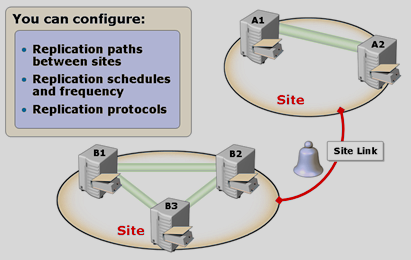
There is little control over replication within a single site, so additional sites are created and connected through site links, allowing replication to be controlled.
Configuring replication paths
Site links precisely define which sites can replicate with which others. Their costs also favour one link over another, so replication uses faster or cheaper connections but can temporarily use slower or more expensive links if a connection fails. Even when all sites can reach one another, we can influence which replication paths are preferred
Configuring replication schedules
Site links define the time periods, days and intervals during which replication occurs. The default interval is 180 minutes
Configuring the replication protocol
At site-link level, replication can use RPC (the default) or SMTP. If a firewall blocks RPC, SMTP (Simple Mail Transfer Protocol, port 25) can be used, assuming the firewall allows it
Comparing replication within and between sites
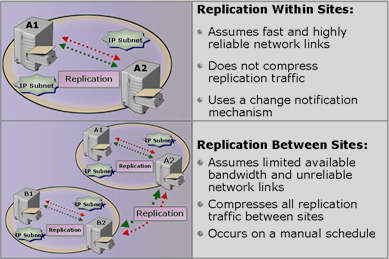
Replication within a site:
- a fast connection is assumed, so replication is uncompressed
- replication occurs automatically after a DC reports a change
Replication between sites:
- the connection may be slow, so replication is automatically compressed
- replication can be scheduled
Generating the replication topology: Intersite Topology Generator
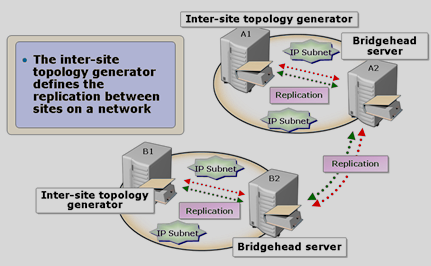
Each site has one DC responsible for generating the ideal replication topology: the Inter-Site Topology Generator (ISTG). Its KCC service re-evaluates and generates replication paths whenever a change affects replication. Replication between sites occurs exclusively through bridgehead servers selected by KCC. If a DC designated as a bridgehead server fails, the KCC service on the ISTG selects another available DC as bridgehead to maintain intersite replication. These processes happen automatically in the background.
Unidirectional replication “Unidirectional Replication”
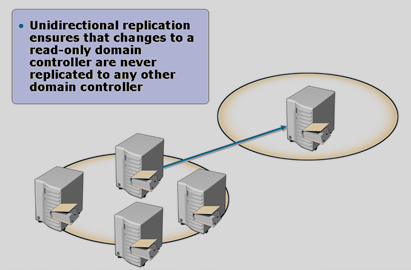
Because an RODC has no writable database, AD replication always flows one way from a DC with a writable AD database. When an RODC is installed and assigned to a site, KCC selects a writable DC and creates one-way replication to the RODC.
Site Link Bridging
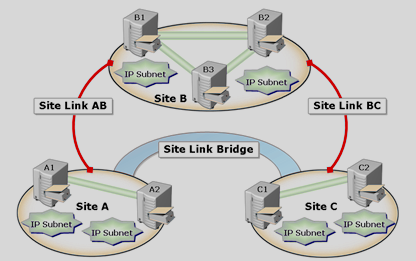
Site link bridging allows a bridgehead server in one site to replicate directly with a bridgehead server in another, even if they do not share a site link. In the illustration, without a bridge between sites A and C, replication would first occur between A and B, then B and C. Bridging permits replication directly from A to C over the network connections from A to B to C.
Universal Group Membership Caching
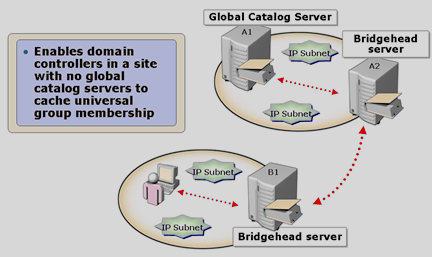
Universal Group Membership Caching allows DCs in a site without a Global Catalog to cache universal group memberships temporarily, avoiding a Global Catalog query during authentication of those memberships.
Komentáře