


AD DS trusts allow mutual trust (authentication) between domains and forests. Users can authenticate in their own domain and use their credentials (security ticket) to access shared resources in another domain.
All AD trusts have the following characteristics
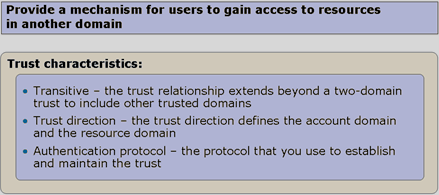
- Transitive – Trusts can be transitive or non-transitive. A transitive trust propagates to all domains in the same tree. For example, a trust is created automatically when additional domains are added to an existing tree, ensuring that all domains in the tree trust each other and shared resources can be accessed in both directions.
- Trust direction – Trust direction defines where user accounts and shared resources reside in the trusted and trusting domains. Windows Server 2008 has three trust directions: one-way incoming, one-way outgoing and two-way. A trust can therefore be one-way in either direction or two-way.
- Authentication protocol – Trusts may use different authentication protocols: Kerberos version 5 or Windows NT Local Area Network (LAN) Manager (NTML). In most cases, Windows Server 2008 automatically uses Kerberos to establish a trust, primarily because of its stronger security guarantees.
Windows Server 2008 supports these trusts (Trust Options)
|
Trust type |
Description |
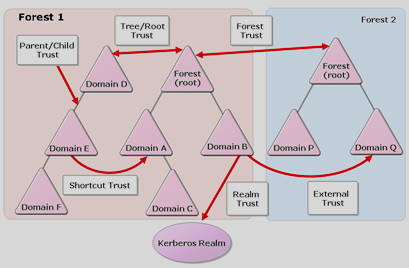
| Parent/child | A transitive trust between domains in the same tree. This two-way trust is created automatically when another domain is added to the tree and cannot subsequently be removed. It always uses Kerberos. |
| Tree/root | A transitive trust between all domains of a tree in a forest. This two-way trust is created automatically when another domain of a different tree is added and cannot subsequently be removed. It always uses Kerberos. |
| External | A non-transitive trust can be created between domains that are not in the same forest. It may be one-way or two-way. External trusts always use NTLM. |
| Realm | A trust used for systems other than Windows Server that use Kerberos (Kerberos realm). It may be one-way or two-way, transitive or non-transitive. Realm trusts always use Kerberos. |
| Forest | Can be created between forests whose forest functional level is at least Windows Server 2003. It may be one-way or two-way, transitive or non-transitive. Forest trusts always use Kerberos. |
| Shortcut | Provides a direct connection between two domains, accelerating access to shared resources. Shortcut trusts always use Kerberos. |
How trusts work within a forest.
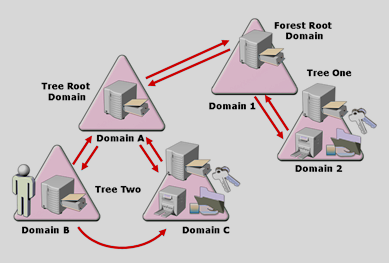
When trusts are established between domains or forests in the same structure, their information is stored in AD and can be retrieved through the global catalog. Creating a trust also creates a TDO (Trust Domain Object), containing information about the trusted domain's location, shared services, etc. When a user in domain 1 needs resources in domain 2, their DC uses the global catalog to locate the target domain, then contacts parent domain A through Kerberos according to the configured trusts. It forwards the request to domain 1, which forwards it to domain 2. After authentication, domain 2 issues the requested shared-folder access ticket, which returns along the same path to the user. The user then accesses domain 2 directly and authenticates using that ticket.
How trusts work between forests.
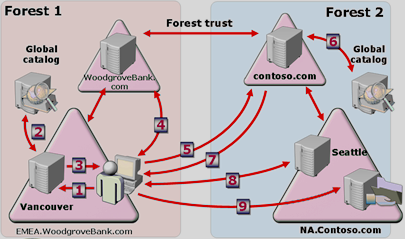
Trusts between different forests work differently from trusts within one forest. If a user in EMEA.WoodgroveBank.com requests shared services in NA.Contonso.com, they first contact their EMEA.WoodgroveBank.com domain controller for a ticket. That DC asks its global catalog where NA.Contonso.com is located. Because the catalog holds information only about domains in its own forest, it cannot find the domain. It then checks AD for a trust with the requested domain. Once found, the information is sent to the user's computer, which contacts the root domain contonso.com directly through the trust. This domain consults its own global catalog to locate the resources and requests a ticket for the computer in EMEA.WoodgroveBank.com. The issued ticket returns to the computer with information about where to contact the shared services. The computer then contacts NA.Contonso.com directly, authenticates with the ticket and accesses the services.
Komentáře