


How to send an email notification from a workflow containing an HTML link to the item on which the workflow was started.
Instructions for sending an email notification from a workflow with a link back to the item.
- File – New – Workflow
- select the list containing the items for which you want to send notifications, and change the start option to "when a new item is created" – the workflow will then start whenever a new item is created in the selected list
- In the Actions section, select "Send Email", or, if you use Czech SharePoint, "Odeslat Email“
- Fill in To: (To: the email recipient)
- Subject: (message subject)
- Fill in the message body, using the following link to the item:
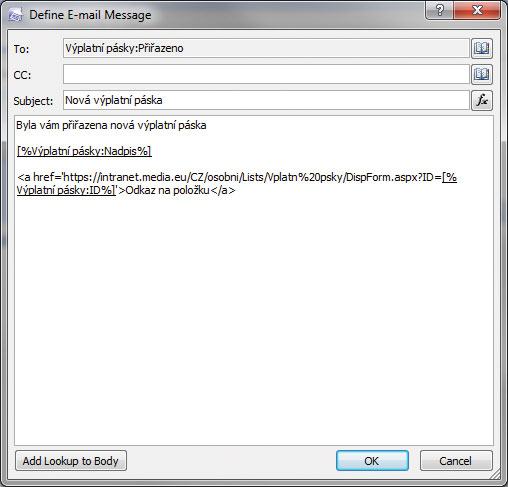
- https://intranet.media.eu/CZ/osobni/Lists/Vplatn%20psky – enter the actual URL of the list
- [%Vplatn%20psky:ID%] – insert using the Add Lookup to Body button and, under Field find ID and finish by clicking OK
Komentáře