


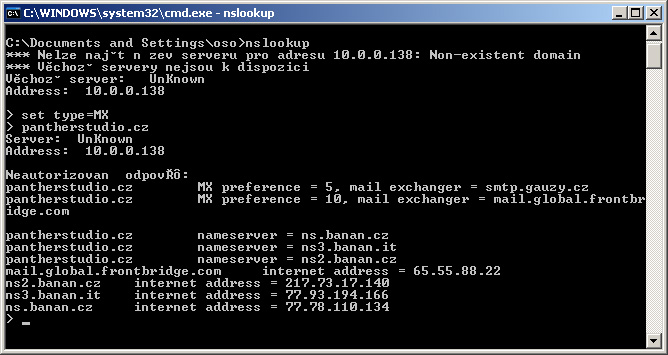
You can query the MX records of a specific domain, also known as an MX lookup, from the command line (cmd) using nslookup. Here is an example of an MX lookup for the pantherstudio.cz domain
Looking up MX records for the domain "pantherstudio.cz
- In the Start menu, click Run and, in the Open field, enter cmd. This opens the command-line tool.
- At the command prompt, enter nslookup. The assigned DNS server for subsequent queries is displayed.
- At the command prompt, enter set type=MX. Sets the query type to MX records
- At the command prompt, enter pantherstudio.cz. Displays the MX records for pantherstudio.cz (see Figure 1)
MX lookup results for pantherstudio.cz:
Two records were found:
- 5 smtp.gauzy.cz
- 10 mail.global.frontbridge.com
Komentáře