


SharePoint Online introduces a feature called Custom script allowing custom script execution to be disabled.
What does this feature actually offer – or does it take something away?
First, remember that Custom script has existed in SharePoint from the beginning, enabling many site and Web Part features. Microsoft is not adding something new, but allowing those features to be disabled, and has chosen this as the default for new tenants.
Why? Here is Microsoft's explanation:
"… Some changes, such as a heading style or page layout, can be made by clicking a ribbon button. Others are more complex, requiring custom script or markup language embedded in Web Parts or run in Windows PowerShell.
Adding custom scripts to sites and pages is controlled by Add and Customize Pages permission. Global administrators choose which users and groups receive it. However, anyone creating a personal or team site automatically owns it, and owners can add any scripts to its pages.
Many administrators want users to create sites freely, encouraging collaboration and reducing urgent administrative work. However, you may want to limit scripting to maintain security and integrity across the tenant…"
Whatever the explanation, this moves away from original site collections towards new team sites based on new libraries and pages, where Custom script will no longer be needed.
Those wanting original site collections with all their capabilities can still enable Custom script! 🙂 If following Microsoft's recommendation instead, know which site features and Web Parts will become unavailable.
Custom script – allowing or preventing custom script execution

The feature Custom script is found in the SharePoint admin center on the Settings tab, where custom scripts can be allowed or blocked on personal and self-service-created sites.
The setting applies to:
- Personal sites (Personal sites)
- Self-service-created sites (Self-service created sites) – All manually created site collections!
- Root site collection (The Root Site Collection of the Tenant)
Note:
After changing the setting, allow up to 24 hours for it to apply to individual collections.
Custom script – features affected by blocking scripting
Blocking custom scripts makes these site features and Web Parts unavailable:
Unavailable site features
| Site feature (Site feature) |
Behaviour | Notes |
| Save Site as Template (Save Site as Template) |
No longer available in Site Settings. | Sites can still be created from templates saved before scripting was blocked. |
| Save document library as template (Save document library as template) |
No longer available in Library Settings. | Libraries can still be created from templates saved before scripting was blocked. |
| Solution Gallery (Solution Gallery) |
No longer available in Site Settings. | Solutions created before scripting was blocked can still be used. |
| Theme Gallery (Theme Gallery) |
No longer available in Site Settings. | Themes created before scripting was blocked can still be used. |
| Help Settings (Help Settings) |
No longer available in Site Settings. | Existing help file collections remain accessible. |
| HTML Field Security (HTML Field Security) |
No longer available in Library Settings. | Existing library HTML Field Security settings remain usable. |
| Sandbox solutions (Sandbox solutions) |
Solution Gallery is absent from Site Settings, preventing adding, managing or upgrading sandbox solutions. | Previously deployed sandbox solutions can still run. |
| SharePoint Designer | Site Pages: Non-HTML pages can no longer be updated.
List processing: The features Create Form and Custom Action no longer work. Subsites: The feature New Subsite and Delete Site redirect to Site Settings in the browser. Data sources: The button Properties is unavailable. |
Existing data sources can still be opened. |
| Uploading files that potentially include scripts (Uploading files that potentially include scripts) |
These file types can no longer be uploaded.
|
Existing library files are unaffected. |
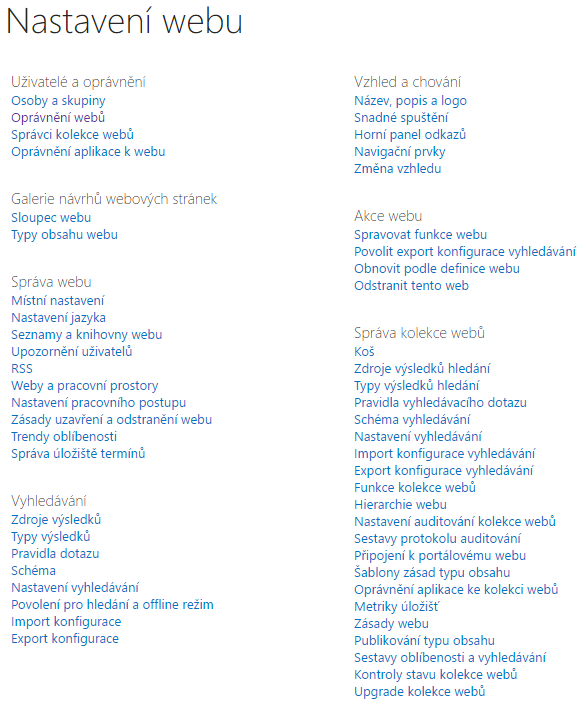
Example of restricted site settings after blocking custom scripts (no-script):
Unavailable Web Parts
| Web Part category (Web part category) |
Web Part (Web part) |
| Blog |
|
| Business Data (Business Data) |
|
| Community (Community) |
|
| Content Rollup (Content Rollup) |
|
| Document Sets (Document Sets) |
|
| Forms (Forms) |
|
| Media and Content (Media and Content) |
|
| Search (Search) |
|
| Search-Driven Content (Search-Driven Content) |
|
| Social Collaboration (Social Collaboration) |
|
| Master Page Gallery |
|
| Publishing Sites |
|
Custom script – PowerShell
Custom script can also be controlled with this PowerShell command:
Set-SPOsite "SiteURL" -DenyAddAndCustomizePages 0
Note:
- Can be applied to selected collections
- The change applies immediately, but if it differs from the setting in the SharePoint admin center,it is reverted within 24 hours
Custom script – article links
Komentáře