


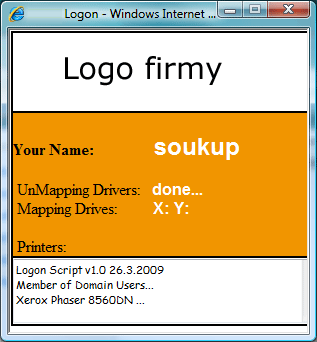
If you need to map shared drives or printers at logon according to users' AD group membership and display the mapping status, you can use a VBS logon script and an HTML page to display the status. Example of creating a VBS logon script: the example maps a central printer and drives X: and Y: for all users in Domain Users and maps drive T: to a different location for users in G_CZ_Production and G_CZ_Sales.
VBS logon script for mapping drives and printers using AD groups, with a graphical interface
(contents of the file login.vbs)
On Error Resume Next Dim WshNetwork, asdPath, User Dim strMappedDrives, strStatus Dim IE Const ADS_READONLY_SERVER = 4 ' Zobrazeni IE status window Call CreateIE() strStatus = "Logon Script v1.0 " & Date() ie.document.all.wstatus.InnerText = strMsg3 ' Ziskani Username Set WSHNetwork = WScript.CreateObject("WScript.Network") strUser = "" While strUser = "" strUser = WSHNetwork.UserName Wend ie.document.all.Msg1.InnerText = strUser ' ----------------------------------------------------------- ' --- Zrušení kontroly signatury u exe files ---------------- ' ----------------------------------------------------------- Set Shell = CreateObject("Wscript.Shell") Shell.RegWrite "HKCU\Software\Microsoft\Internet Explorer\Download\CheckExeSignatures","no","REG_SZ" Shell.RegWrite "HKCU\Software\Microsoft\Internet Explorer\Download\RunInvalidSignatures","1","REG_DWORD" ' ----------------------------------------------------------- ' --- Mapování tiskárny \\server\Phaser8560 ' ----------------------------------------------------------- Set Wshnetwork = CreateObject("WScript.Network") WshNetwork.addwindowsPrinterConnection "\\server\Phaser8560" WshNetwork.SetDefaultprinter "\\server\Phaser8560" strpl = "Xerox Phaser 8560" ie.document.all.Msg2.InnerText = strpl ' ----------------------------------------------------------- ' --- Odmapování síťových disků X: Y: T ' ----------------------------------------------------------- Set Apl = WScript.CreateObject("WScript.Shell") Apl.Run "net use x: /delete", 7 Apl.Run "net use y: /delete", 7 Apl.Run "net use t: /delete", 7 strpl = "done..." ie.document.all.Msg3.InnerText = strpl ' ----------------------------------------------------------- call main() strStatus = strStatus & vbCRLF & "Network Logon Complete..." ie.document.all.wstatus.InnerText = strStatus ' Zavreni IE Status window If not ie.document.all.holdit.checked Then Wscript.Sleep 600 ie.quit() End if ' Konec LogOn Scriptu Public Sub Main() ' ----------------------------------------------------------- ' --- WinNT://pantherstudio.local změňte na název domény ' ----------------------------------------------------------- 'Main loop to detect group that user belongs to adsPath = "WinNT://pantherstudio.local/" & strUser Set dso = GetObject("WinNT:") Set objUser = dso.OpenDSObject(adsPath,"","", ADS_READONLY_SERVER) For Each Prop In objUser.groups Select Case Prop.Name ' ----------------------------------------------------------- ' --- Ověřování uživatelů bude na základě skupin Domain Users, G_CZ_Production, G_CZ_Sales ' ----------------------------------------------------------- Case "Domain Users" Call DomainUsers() Case "G_CZ_Production" Call Production() Case "G_CZ_Sales" Call Sales() 'etc End Select Next 'Prop End Sub ' ---------------------------- 'Mapování disku Y: X: pro uživatele skupiny Domain Users ' ---------------------------- Sub DomainUsers() strStatus = strStatus & vbCRLF & "Member of Domain Users..." ie.document.all.wstatus.InnerText = strStatus MapDrive "X:", "\\pantherstudio.local\images" MapDrive "Y:", "\\pantherstudio.local\shared" End Sub ' ---------------------------- ' Mapování disku T: pro uživatele skupiny G_CZ_Production ' ---------------------------- Sub Production() strStatus = strStatus & vbCRLF & "Member of Production..." ie.document.all.wstatus.InnerText = strStatus MapDrive "T:", "\\server\FTP_Production" End Sub ' ---------------------------- ' Mapování disku T: pro uživatele skupiny G_CZ_Sales ' ---------------------------- Sub Sales() strStatus = strStatus & vbCRLF & "Member of Production..." ie.document.all.wstatus.InnerText = strStatus MapDrive "T:", "\\server\FTP_Sales" End Sub ' ---------------------------- ' Spuštění grafického zobrazení, opravte skutečnou cestu k souboru login.htm, Wscript.Sleep 1200= čas zpoždění scriptu ' ---------------------------- Sub CreateIE() On Error Resume Next Set IE = CreateObject("InternetExplorer.Application") With IE .navigate "\\server\shared\LoginScript\login.htm" .resizable=0 .height=332 .width=307 .menubar=0 .toolbar=0 .statusBar=0 .visible=1 End With Do while ie.Busy ' wait for page to load Wscript.Sleep 1200 Loop End Sub ' ----------------------------------------------------------- Sub MapDrive(strDrive,strShare) On Error Resume Next WSHNetwork.MapNetworkDrive strDrive, strShare If Err.Number Then WSHNetwork.RemoveNetworkDrive strDrive WSHNetwork.MapNetworkDrive strDrive, strShare End If strMappedDrives = strMappedDrives & strDrive & " " ie.document.all.Msg4.InnerText = strMappedDrives End Sub
Komentáře