


I recently needed to read managed metadata column values (term names) in Workflow 2013. Online articles suggested everything from calculated fields to declaring the problem impossible.
Even without Workflow 2013's web service call action, non-programmers can solve this using standard actions.
First, understand the difficulty: term values contain not only the name but also the unique identifier of the term set where they are stored.
For example: LETITIA|a24e0286-430c-469f-9c74-379c06863577
Term name: LETITIA
Term set ID: a24e0286-430c-469f-9c74-379c06863577
To use only the name, remove the unique identifier and its | separator.
As promised, this is possible, though not entirely straightforward. Remember:
- The exact number of characters in the term name is unknown.
- A specified number of characters cannot be removed from the end while retaining the required beginning.
- The name and unique identifier are always separated by |.
That separator provides the solution: examine characters one by one from the start until finding it. The number of iterations gives the name's exact character count.
How is this done in Workflow 2013?
Use these Workflow 2013 actions:
- Loop with Condition
- Extract Substring from Start of String
- Extract Substring from End of String
- Do Calculation
- Set Workflow Variable
- Log to History List
and variables:
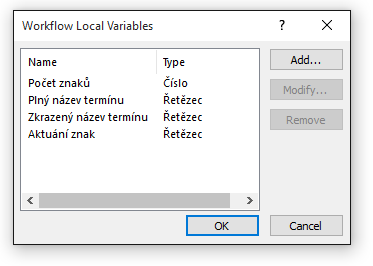
- Character count (Number)
- Full term name (String)
- Short term name (String)
- Current character (String)
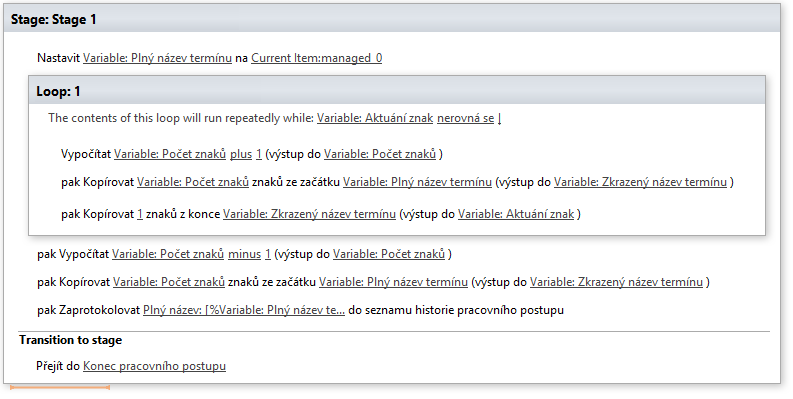
The workflow looks like this:
- Using “Set Workflow Variable”, store the term value in “Full term name“
- Create a loop using “Loop with Condition” and set a condition to repeat while “Current character“ nebude obsahovat znak |.
- Inside the loop, create:
- Using “Do Calculation” to increment “Character count“ hodnotu 1. (The Character count variable increases by 1 with each loop iteration)
- Using “Extract Substring from Start of String”, using “Character count” as the character count, to copy that many characters into “Short term name“
- Then, from “Short term name”, use “Extract Substring from End of String” to copy one character into “Current character”.
(Once the variable contains |, the loop ends and Character count contains the term name's length including its separator)
- After the loop, use “Do Calculation” to subtract from “Character count“ hodnotu 1.
(The current character count includes the separator, which we want to remove) - Repeat “Extract Substring from Start of String”, now using the adjusted “Character count”
(Short term name now contains only the term name) - To check the result, use “Log to History List” to write to the history list, displaying both “Full term name” and “Short term name“
If correct, workflow history shows the original term value and its required shortened version.

I agree that this is convoluted, but the important point is that it is possible.
Komentáře