


As a Windows Server® 2008 administrator, you maintain Active Directory® Domain Services (AD DS) domain controllers. Important tasks include offline defragmentation, NTDSUtil.exe modifications and locking down services.
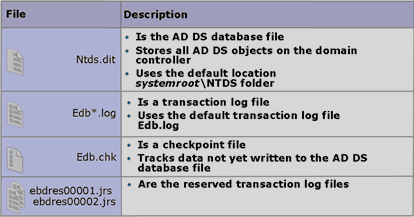
Every AD database has an Extensible Storage Engine (ESE), managing storage of all AD DS objects. ESE uses the database and temporary transaction logs, which are written to the AD DS database after filling (10 MB) and passing integrity checks.
AD DS storage contains these files:
|
File |
Description |
| Ntds.dit | The AD DS database holding all AD DS objects on each domain controller. The default location is %systemroot%\NTDS. |
| Edb*.log | Transaction logs record transactions. Each log is 10 MB. AD DS records every transaction in one or more logs associated with Ntds.dit. When Edb.log fills, AD DS renames it Edbnnnnn.log, with nnnnn incrementing from 1. |
| Edb.chk | The checkpoint file tracks data not yet written from transaction logs to the database, identifying what was and was not written if the server fails. After writes are confirmed through the checkpoint, transaction logs are progressively deleted. |
| ebdres00001.jrs and ebdres00002.jrs | Reserved transaction log files. Reserved disk space stores transactions only if the hard disk has sufficient space to create new transaction logs. |
How changes are made to the AD DS database.
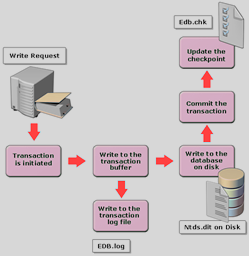
Changing AD DS data has six steps:
A write request starts a transaction
- AD DS writes the transaction to the transaction buffer
- AD DS writes it to the transaction log (EDB.log)
- AD DS writes it from the transaction buffer to the database
- AD DS compares the database write with the transaction log to verify success
- AD DS updates the checkpoint file to record successful database storage
Managing the AD DS database with NTDSUtil
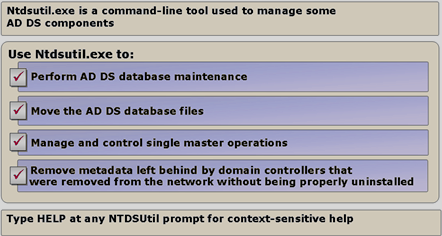
Ntdsutil.exe is a low-level AD DS database administration tool for tasks unavailable in graphical consoles, such as moving database files, authoritative restores, changing the Security Account Management password, offline defragmentation and creating database snapshots.
The AD DS database and defragmentation
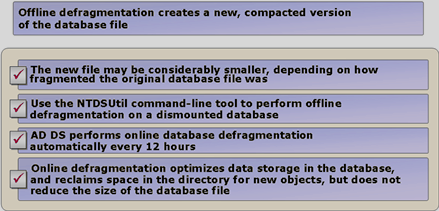
Defragmentation rewrites AD DS records to adjacent disk sectors, reducing database size, improving access and reading speeds, and optimising performance. It can be online (AD DS running) or offline (AD DS unavailable to users).
Online defragmentation
- runs automatically every 12 hours
- reorganises records (cleanup), but leaves unused database space in place
Offline defragmentation
- requires ntdsutil.exe
- creates a reorganised database copy that replaces the original on completion
- reclaims unused database space, reducing total database size
What are restartable AD DS services?
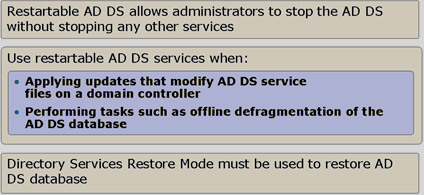
Windows Server 2008 lets AD DS services stop and restart while the server remains running. Earlier versions required restarting into Active Directory Restore Mode for offline maintenance, such as defragmentation or moving the database. Windows Server 2008 can take AD DS offline at any time with minimal impact on other services.
Windows Server 2008 DCs have three possible states:
|
Status |
What it does: |
| AD DS running | Every DC starts in this state automatically. |
| AD DS stopped | AD DS is stopped. This state shares some characteristics with DSRM (Directory Services Restore Mode): the local DC is offline, but other DCs can be contacted for logon. Offline defragmentation is possible, but restoring the entire AD DS database requires DSRM. |
| DSRM (Directory Services Restore Mode) | This mode is unchanged since Windows Server 2003. All AD DS services are offline in DSRM, allowing restoration of the AD DS database from backup. |
Stopping AD DS also stops:
- Kerberos Key Distribution Center (KDC)
- Intersite Messaging
- File Replication Service (FRS)
- DNS Server
Locking down services on a domain controller (Locking Down Services on Domain Controller)
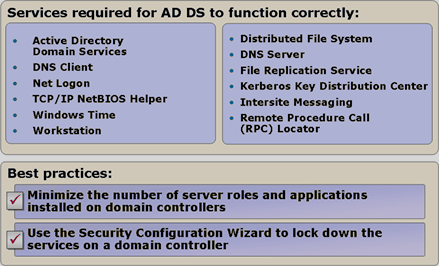
As part of a security plan, remove unnecessary DC services and features to reduce attack risk and improve performance. Disable services manually or use SCW (Security Configuration Wizard) to stop them based on selected server roles.
Optimal AD DS operation requires:
-
Active Directory Domain Services
-
DNS Client
-
NetLogon
-
TCP/IP NetBIOS Helper
-
Windows Time
-
Workstation
-
Distributed File System
-
DNS Server
-
File Replication Service
-
Kerberos Key Distribution Center
-
Intersite Messaging
-
Remote Procedure Call (RPC) Locator
Komentáře