


Group Policy applies numerous security settings, including password complexity, folder and registry permissions, authentication protocols and communication encryption.
Security areas
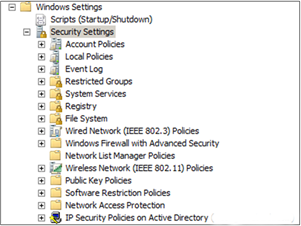
Security areas supported from Windows Server 2003 R2 and Windows Server 2008 are:
|
Security areas |
Description |
|
Account Policies
(Account Policies)
|
password policies, account lockout, Kerberos |
|
Local Policies
(Local Policies)
|
audit policies, user rights assignment, security options |
|
Event Log
(Event Log)
|
application, system and security event log settings |
|
Restricted Groups
(Restricted Groups)
|
security group membership |
|
System Services
(System Services)
|
system service startup and security |
|
Registry
(Registry)
|
registry permissions |
|
File System
(File System)
|
folder and file permissions |
|
Wireless Network Policies (IEEE802.3)
(Wireless Network (IEEE802.3) Policies)
|
wireless communication security (IEEE802.3) |
|
Public Key Policies
(Public Key Policies)
|
public key management and distribution |
|
Software Restriction Policies
(Software Restriction Policies)
|
controls software execution |
|
IP Security Policies
(Internet Protocol security (IPsec) Policies
|
assigns IPsec security to computers
|
Windows Server 2008 R2 adds these areas:
|
Security areas |
Description |
|
Windows Firewall with Advanced Security
(Windows Firewall with Advanced Security)
|
Windows Firewall configuration |
|
Network List Manager Policies
(Network List Manager Policies)
|
network list policies |
|
Wired Network (IEEE802.3) Policies
(Wired Network (IEEE802.3) Policies)
|
LAN policies using IEEE802.3 |
| Network Access Protection (NAP) (Network Access Protection) | controls computer network access through NAP (checks required software, updates, etc. before granting network access |
What is the default domain security policy (Default Domain Security Policy)?
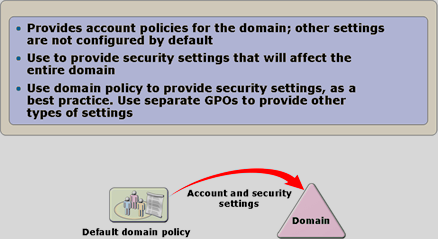
One default security policy is default domain policy, created automatically during domain installation with several predefined security policies, specifically Account Policies. Although it contains all settings and options, it is recommended only for Account Policies; create another GPO for other settings.
If misconfigured, you can reset the Default Domain Policy
- Sign in as a domain administrator.
- Run command line (cmd).
- Enter the command dcgprofix /target:Domain
What are Account Policies?
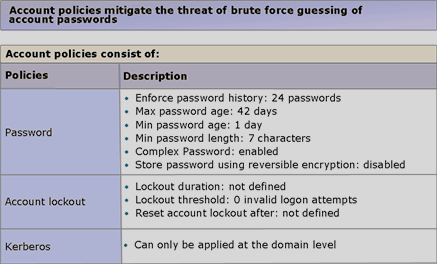
Using Account Policies you can manage passwords (length, complexity, lifetime, history, etc.), account lockout (duration, number of attempts) and Kerberos. Note that Account Policies do not apply directly to computers, but to domain controllers, which enforce the settings during client logon.
Account Policies always configure through default domain policy, which must be at the domain root.
Account Policies on local computers, they apply only to local users !
What are Local Policies?
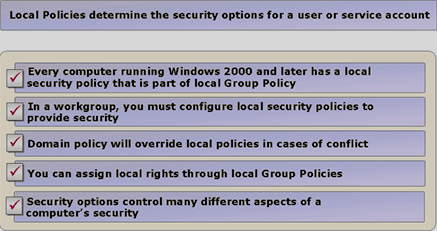
Every computer running Windows 2000 or later has exactly one (Local Group Policy Object – LGPO). LGPOs exist on every computer whether domain-joined or not, and are stored in the hidden folder %windir%\system32\Group Policy. The Group Policy directory and LGPO are created when the LGPO is first configured. LGPOs have the lowest priority and apply first.
LGPOs have fewer settings than domain GPOs, lacking, for example, folder redirection and software installation.
What are user rights?
What are Network Security Policies
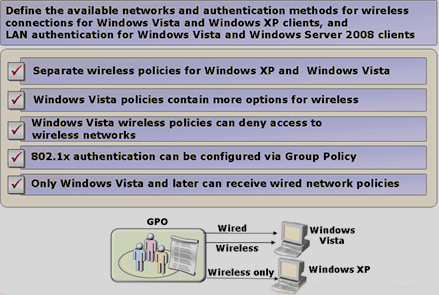
Windows Server 2008 and Windows Vista introduce separate security policies for WiFi (Wireless) connections and wired LAN connections. For example, define different authentication methods for LAN and Wi-Fi. Wi-Fi policies can also be separate for Windows XP clients and Windows Vista or later clients.
Windows Firewall with Advanced Security (Windows Firewall with Advanced Security)
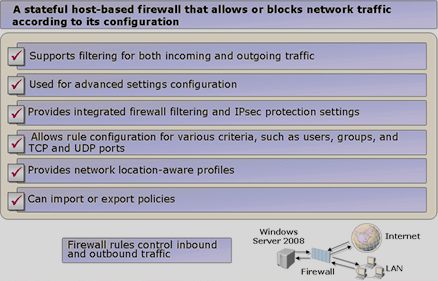
Windows Vista and Windows Server 2008 include a new, enhanced Windows Firewall.
What is new?
- filtering inbound and outbound traffic
- a new MMC snap-in for advanced configuration
- integration of firewall filtering with Internet Protocol Security (IPsec)
- network traffic rules for programs, ports, predefined rules or custom rules
- profiles
What is Fine-Grained Password Policies
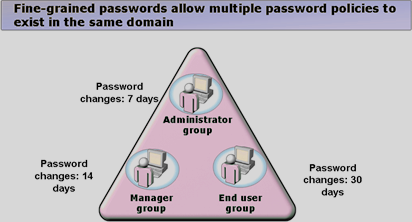
Earlier AD DS versions allowed only one domain policy, Account Policies, namely default domain policies, applying password settings domain-wide. Different password complexities could not be defined for individual users, groups or OUs.
Windows Server 2008 introduces this ability through Fine-Grained Password Policies.
Deploying Fine-Grained Password Policies.
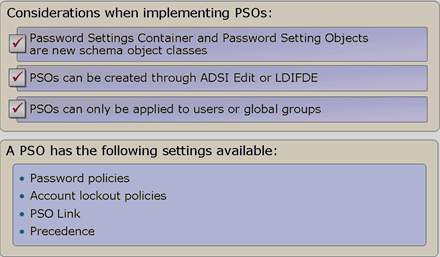
Fine-Grained Password Policies cannot simply be enabled; use ADSI Edit or LDIFDE to modify AD directly.
Find the exact procedure here:
Step-by-Step Guide for Fine-Grained Password and Account Lockout Policy Configuration
What are Restricted Group Membership)
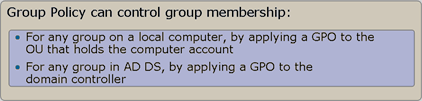
Sometimes group membership must be controlled, for example membership of computers' local Administrators group. Use Restricted Groups (Restricted Groups) to manage local computer groups and their members through GPOs.
What is Software Restriction Policy?
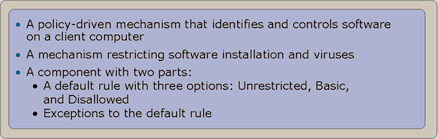
Software Restriction Policy limits software access and prevents execution of specific application types, such as VB scripts. It gives administrators a controlled way to identify software and manage its ability to run on clients. Applied to computers, it affects every user signing in to those computers; applied to users, it affects the particular user regardless of which computer they use.
Software Restriction Policy is useful for:
- combating viruses
- controlling which ActiveX controls can be downloaded
- running only digitally signed scripts
- ensuring that only approved software is installed
Software Restriction Policy has three security levels, specified when creating a policy.
|
Security level |
Description |
| Unrestricted (Unrestricted) | Software permissions follow the user's permissions. This level permits all software except as restricted by rules, and is the default. |
|
Basic User
(Basic User)
|
Allows programs to run under a non-administrative user and access resources as a normal user. |
| Disallowed (Disallowed) | The program cannot run regardless of user permissions. This level blocks all software except as allowed by rules. |
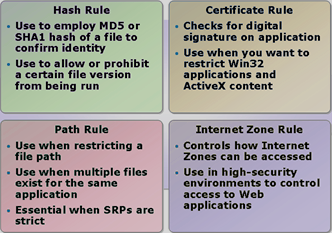
Software Restriction Policy rule options
|
Rule |
Description |
|
Hash rule
(Hash rule)
|
A hash is a unique program identifier, like a fingerprint, based on cryptographic calculation of file contents. Hash rules compare Message Digest 5 (MD5) or SHA1 hashes. The hash uniquely identifies a program or executable even after moving or renaming it. A new or recompiled application version (update) requires a new hash rule. |
|
Certificate rule
(Certificate rule)
|
Allows only applications signed by the certificate publisher. |
|
Path rule
(Path rule)
|
Specifies a folder or full program path. A folder rule also applies to all its subfolders. Path rules support Universal Naming Convention (UNC). When multiple path rules apply, the most specific paths take priority. |
|
Internet zone rule
(Internet zone rule)
|
Internet zone rules are based on Microsoft® Internet Explorer's security zones ®. They allow or block application downloads according to security zone. A rule can be created for each of five zones: Internet, local computer, local intranet, restricted sites and trusted sites. They apply only to software using Windows Installer.
|
What are Security Templates
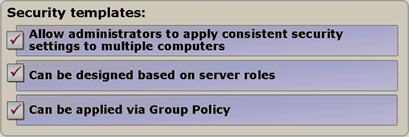
Security Templates are collections of predefined settings covering all security areas. You can use Security Templates as a starting point for a security policy, then customise it to your needs.
Where can you obtain Security Templates ?
Windows Server 2008 no longer includes Security Templates as earlier Windows versions did. Import them from sources such as the Windows Server 2003 Security Guide, or use third-party templates. You can also use the Security Configuration Wizardto guide you through creating Security Templates.
What is Security Configuration Wizard
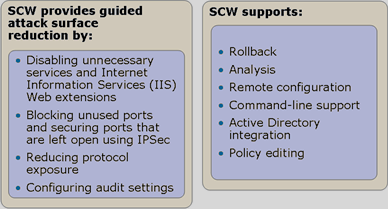
Security Configuration Wizard is a server attack-surface reduction tool introduced in Windows Server 2003 Service Pack 1 (SP1). Security Configuration Wizard helps administrators create security policies and identifies the minimum functionality required for each server role, disabling everything unnecessary for proper operation (ports, services, etc.). The security policy created using Security Configuration Wizardis defined by XML files applied to service configuration, network security, specific registry values, audit policy and Internet Information Services (IIS).
Use is not recommended on Security Configuration Wizard on Windows Small Business Server 2003 !!
Komentáře