


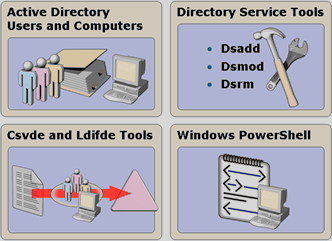
To manage AD DS objects, we most often use the Active Directory Users and Computer console. To change multiple objects in bulk, automate object creation, etc., we can use other tools for modifying AD DS objects – cmd, LDIFDE, CSVDE and Powershell.
Tools
Active Directory Users and Computers
With Active Directory Users and Computers, you can change selected properties of multiple user accounts at once within one OU, or through the search function.
Command line tools
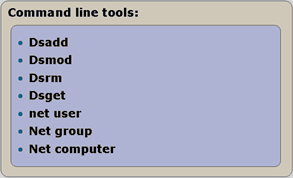
You can also use the command-line tools dsadd, dsmod and dsrm to manage AD DS user accounts, computers and groups. Specify the type of object you want to create, modify or delete.
Csvde
Imports and exports Active Directory data using CSV (comma-separated values) files. It also supports batch operations based on the standard CSV file format.
Ldifde
Creates, modifies and deletes directory objects on computers running Windows Server 2003 or Windows XP Professional. Ldifde can also extend the schema, export Active Directory user and group information to other applications or services, and add data from other directory services to Active Directory.
Windows PowerShell
Windows PowerShell is a new extensible shell and scripting language offering new ways to manage and configure Windows systems. With over 130 command-line tools, consistent syntax and many extensions, it provides greater control over the system and efficient automation. It requires at least .NET Framework 2.0.
Command Line (cmd)
|
Command |
Explanation |
Example |
| Dsadd | Adds an object to AD DS. | dsadd user “cn=Keith Harris,cn=users,dc=contoso,dc=com” –samid Keith fn Keith –ln Harris –display “Keith Harris” –pwd Pa$$w0rd |
| Dsmod | Modifies an AD DS object. | dsmod computer “cn=sales2,ou=sales,dc=contoso,dc=com” -loc Downtown –desc Workstation |
| Dsrm | Removes an object from AD DS. | Dsrm “cn=Keith Harris,cn=users,dc=contoso,dc=com” |
| Dsget* | Finds an object in AD DS. | dsget user “cn=Keith Harris,cn=users,dc=contoso,dc=com” -memberof |
| net user |
Adds or modifies a user account.
|
net user “Gregory Weber” Pa$$w0rd /ad |
| Net group | Adds or removes group permissions. | Net group SalesGroup “Gregory Weber” |
| Net computer | Adds or removes a computer account from AD DS. | Net computer //Sales2 /Del |
Ldifde
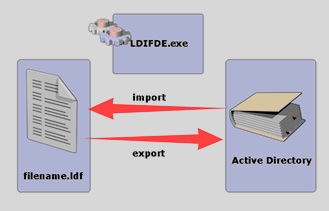
Creates, modifies and deletes directory objects on computers running Windows Server 2003 or Windows XP Professional. Ldifde can also extend the schema, export Active Directory user and group information to other applications or services, and add data from other directory services to Active Directory.
Syntax
Ldifde [-i] [-f Název_souboru] [-s Název_serveru] [-c Řetězec1 Řetězec2] [-v] [-j Cesta] [-t Číslo_portu] [-d DN_databáze] [-r Filtr_LDAP] [-p Obor] [-l Seznam_atributů_LDAP] [-o Seznam_atributů_LDAP] [-g] [-m] [-n] [-k] [-a Rozlišující_uživatelské_jméno Heslo] [-b Uživatelské_jméno Doména Heslo] [-?]
Csvde
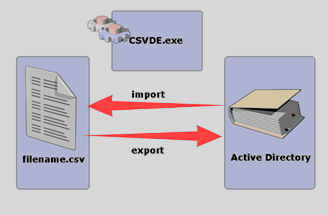
Imports and exports Active Directory data using CSV (comma-separated values) files. It also supports batch operations based on the standard CSV file format.
Csvde is a command-line tool installed by default in %windir%/system32 on Windows Server 2003. To run csvde on a Windows Server 2003 computer, open a command prompt, enter csvde with the appropriate parameters, and press ENTER.
You can also run csvde on Windows XP Professional if Active Directory Application Mode (ADAM) is installed. It is located in %windir%/ADAM. To download ADAM, search the Download Center for Active Directory Application Mode (ADAM) ( http://go.microsoft.com/fwlink/?LinkID=29359) (the page may be in English).
Syntax
Csvde [-i] [-f Název_souboru] [-s Název_serveru] [-c Řetězec1 Řetězec2] [-v] [-j Cesta] [-t Číslo_portu] [-d Rozlišovací_název_databáze] [-r Filtr_LDAP] [-p Obor] [-l Seznam_atributů_LDAP] [-o Seznam_atributů_LDAP] [-g] [-m] [-n] [-k] [-a Rozlišovací_uživatelské_jméno Heslo] [-b Uživatelské_jméno Doména Heslo]
Windows PowerShell
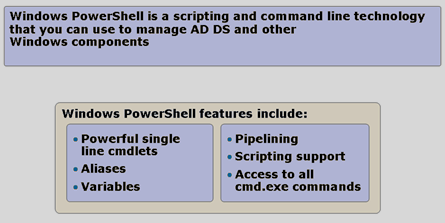
- More information about PowerShell is available in Windows PowerShell 1.0 Documentation Pack.
Komentáře